Gameplay loop
Balatro has a repeating gameplay loop, in which each run has multiple rounds of boss blinds that have to be defeated by achieving a certain score through playing various poker hands.
*Information below is based on the latest version of Balatro (1.0.1o-FULL) unless otherwise stated.
Pre-run
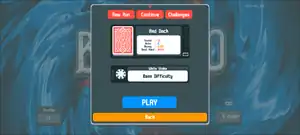
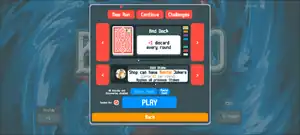

 White Stake is seen at the top left
Upon clicking the play button, an interface will emerge with three tabs at the top (New Run, Continue and Challenges).
The interface defaults to Continue if there is a previous unfinished run, and displays the stake difficulty, deck type and various other information about that run. The player continues from where they previously left off if they click on "play".
If there are no previously unfinished runs, the interface defaults to New Run instead, where various stake difficulties and decks can be chosen from. There is also the option to play a seeded run where the player can input a custom seed. The seed predetermines all the boss blinds, shop options, order of drawing cards, and probability rolls in that run, but disables discovering new items from the collection and score statistics are disregarded (joker, and consumable stats still track your seeded games). Seeded runs can be useful for re-playing a seed, playing the same game along with another person, or for constructing highly optimized specialty runs (such as Naneinf).
A tutorial run is loaded if the player has never played the game before, where Jimbo, the game's mascot joker, will explain the various interfaces of the game while leading the player through an example run.
The Challenges tab is unlocked by winning five runs on unique decks, and contains Challenge Decks with special modified starting conditions that can change the strategies one uses to win. Challenge Decks can only be played on White Stake, and five are available to begin with upon unlocking the tab. The other fifteen can be attained by completing runs on previous Decks in the list.
Actual run
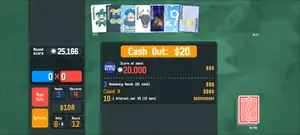
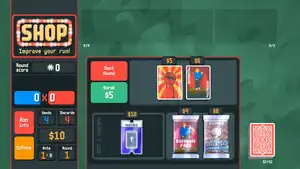
A typical Balatro run is divided into 8 Antes, which have 3 rounds each. A round of Balatro has four different phases: the Blind, Cash Out, The Shop, and the Blind Select screens. The first round, 0, starts on the Blind Select screen, but increments to round 1 upon entering the Blind.
Once the player begins a run, they are presented with the first set of three Blinds: the Small Blind, the Big Blind, and the Boss Blind. The first two of these can be skipped to receive Tags that provide a boost, but the Boss Blind must be defeated to move on to the next Ante.
To defeat a Blind, the player must select up to five cards from their hand to play poker hands and score chips. A given number of discards are available to assist with creating better hands. If the player is unable to reach the blind's chip requirement in the allotted number of hands, or no longer has any cards available to be played, the run is lost, and the player must restart from Round 1.
Upon reaching the chip requirement, the round ends and the player is presented with a Cash Out screen, where they may receive money: a set reward amount depending on the type of blind defeated, plus $1 extra for each remaining hand, any money earned from end of round Economy Jokers, and $1 of interest for every $5 the player already has, up to a base $5 reward for $25. The player may also use and sell cards in this screen. If the Blind defeated was a Boss Blind, the Ante will increment up by one upon reaching the Cash Out screen.
When Cash Out is selected, the player enters The Shop, where various Jokers, Consumables, Vouchers, and Booster Packs can be purchased to improve the run. When exiting the Shop, the Blind Select screen is presented again and the cycle begins anew.
When Ante 8 is completed, the player wins the run, and is presented with the option to start a new run, or to continue in Endless Mode, letting one play as long as is desired before the blind requirements become too much to overcome. If the player did not achieve the required blind score before Ante 8, they will lose the game and be lead to the "Game Over" screen. From there, the player can also start a new run or go back to the main menu.
During gameplay, various parts of the game will be unlocked through special conditions that can be seen in the Collection. When an unlock requirement is met, an icon is shown on the right side of the screen, and all newly unlocked cards, decks , and vouchers will be showcased to the player the next time the Main menu is visited.
Run Info
During a run, the player can click on the red "Run Info" button to view some specific information about their current run. This interface has three panels:
- Poker Hands: By default, it lists all of the non-secret poker hands alongside their current level, the Chips and Mult that they provide, and the number of times that they were used during the entire run (which can be particularly useful to keep track of if the player has
 Obelisk,
  Supernova,
  Telescope, or are currently facing
  The Ox). Specific secret poker hands will appear in this list once they are played during the run.
 - Blinds: It indicates the list of blinds in the current ante in a similar fashion to the blind selection menu, with the blind name, looks, effect (if it is a boss blind), stake, score requirement, reward in money, and skip reward (if it is not a boss blind), all being listed. Each blind also has a listed status:
- Current: It is the current blind that the player has to face. A blind is flagged as the "Current" blind starting from the blind selection, rather than when facing the blind.
- Upcoming: Blinds that come after the current blind during this ante. The next blind to be faced will remain marked as "Upcoming" until the player exits the Shop.
- Skipped: Indicates whenever a
 Small Blind or a
  Big Blind is skipped. Skipping a blind will immediately mark the next blind as the "Current" even while in an opened Booster Pack.
 - Defeated: Indicates when a blind is defeated. Once a boss blind is defeated, the blind info will refresh to show the blinds of the next ante.
- Vouchers: Lists all of the vouchers redeemed during this run.
-
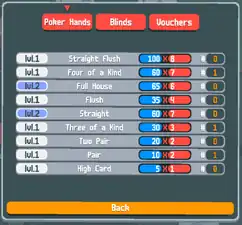 Poker Hands panel
 -
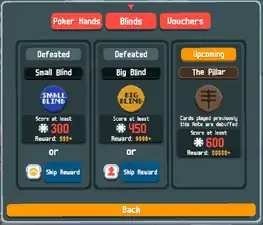 Blinds panel
 -
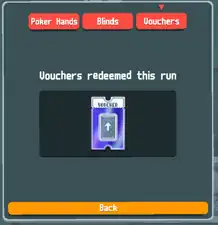 Vouchers panel