Options
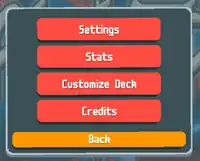
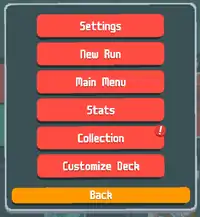
Options is one of the several menus in Balatro.
One of the ways to access this menu is by clicking the yellow "Options" button from the Main Menu, but another way to do so is by clicking that button on the bottom left corner during a run. On desktop, pressing the Esc key while not already in a menu also opens the Options menu.
There are two variants of the Options menu:
- The variant from the main menu: Allows for the player to access some general options, such as settings and stats.
- The variant from the run: Allows for the player to access other menus, like the Collection, or to restart a run.
List of options
The following is a full list of options in the game and what they do.
Common options
The following is a list of options that exist both in the main menu variant and the in-run variant of the list of options.
| Name | Description |
|---|---|
| Settings | Allows for the player to access in-game settings, where they can change video, audio, and graphics. |
| Stats | Allows for the player to access a list of statistics that are recorded in their profile. Some statistics include their best hand, most played hand, progress, card stats, and more. |
| Customize Deck | Allows for the player to customize playing cards in two ways:
|
| Back | Marked as a yellow button, it exits the options menu. |
It should be noted that changing any of the options in the Settings or "Customize Deck" menus will be applied across all profiles.
In-run exclusive options
The following is a list of options that can be found exclusively when accessing options during a run.
| Name | Description |
|---|---|
| New Run | Allows for the player to start a new run. Clicking this option will lead them to the deck selection interface, opened on the "New Run" tab. |
| Main Menu | Immediately leads the player back to the main menu. |
| Collection | Allows for the player to access their Collection menu. |
Main menu exclusive options
The following is the only option that can be found exclusively from the list of options from the main menu:
| Name | Description |
|---|---|
| Credits | Lists everyone who helped out with the game in some way, shape or form. The credits are listed in six different tabs:
|