Einleitung
Benutze diese Anleitung, um die Pentalobe Schrauben, die das Display des iPhone X befestigen, zu entfernen oder zu ersetzen. Es handelt sich um proprietäre Schrauben von Apple, Pentalobe oder five-point genannt, für die du einen speziellen P2 Schraubendreher benötigst.
Werkzeuge

Ersatzteile
-
-
Schalte dein iPhone aus, bevor du daran arbeitest.
-
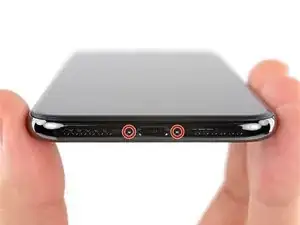
Drehe die beiden 6,9 mm langen Pentalobe Schrauben an der unteren Kante heraus.
-
Abschluss
Um dein Gerät wieder zusammenzusetzen, folge den Schritten in umgekehrter Reihenfolge.

There are 6.81mm long screws!
Daniel -
One of the pentalobe screws is stripped :( - suggestions for how to get it out?
cgtyoder -
same situation here
kaunomarcius -
Same issue for me too, how do I get the stripped screw out?
patronics -
Update: I was able to get the “stripped” screw out using another Pentalobe-2 screwdriver bit from another company. It seems it wasn’t the screw, but the screw driver that was actually stripped. Hence why the other screwdriver kit I got came with 3 of this bit, I suppose.
patronics -
I ended up going to a jewelry store, and they drilled down into the screw, with of course an incredibly tiny bit. That allowed me to insert the P2 driver, and I was able to unscrew it at that point. Good luck!
cgtyoder -
Same issue with the stripping. The tip of the iFixit P2 head in my $70 kit just ground off on the first screw and that was that. Not much you can do.
Kyle Harris -
yes correct the same happened to me, the screws were perfect shaped never been open and as soon as i used the P2 it stripped the screws, seems like the P2 is slightly smaller but Dremel kit with a very small drill bits and precise knife tool is the way to go.
Dulce Vidal -
Hi, there this is a great informative post that is really shareable to all newbies who are interested in the Guide for the mobile phone repair industry. Really the mobile phone repair blogging is a great way to make money online. Thank you for sharing the post.
You may know more about iPhone Repair, https://fixnrepair.org/iphone-repair/
Muhammad Forhad -
This step in automatically followed through, without any thought. Why remove these screws? Can anybody explain? The Screen is detachable all the same, with them well screwed in…
Uri -
These screws attach to a plate that’s part of the screen half of the phone. If you succeed in detaching the screen without removing those, it would seem reasonable that you will have damaged that plate or its ability to keep the two halves together.
Dan Long -
@Dan Long is right
Uri -
Clean out the pentalobe screw heads first so the tool goes all the way in. A small sewing needle works well to loosen any build up and then press some putty/chewing gum into the screw head and pull away quickly for a final clean out.
William Olstad -
The this kit should include screws because you’re going to strip them. Can’t even get past step one. Did anybody figure this out
justin -