Einleitung
Rüste deine RAM Module nach, um die Geschwindigkeit zu verbessern.
Werkzeuge


Ersatzteile
-
-
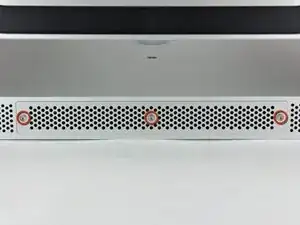
Löse die drei Kreuzschlitzschrauben, mit denen die Abdeckung auf der unteren Seite des iMac befestigt ist.
-
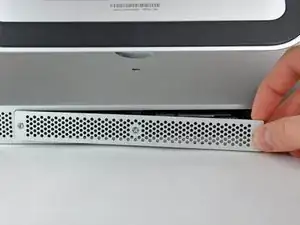
Entferne die Abdeckung des iMacs.
-
-
-
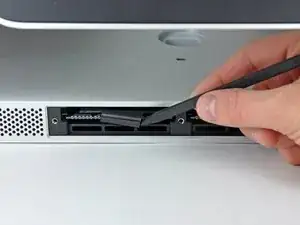
Schiebe mit den Fingern oder der Spudgerspitze die schwarze Zuglasche aus Plastik für die RAM Aufnahme aus der schmalen RAM Öffnung.
-
-
-
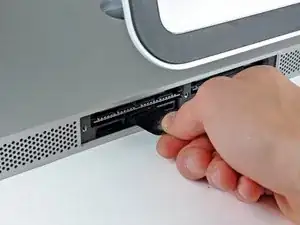
Ziehe die schwarze Lasche aus dem iMac heraus, um die RAM Chip aus ihrem Anschluss auszuwerfen.
-
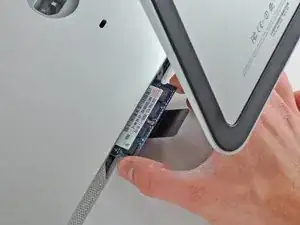
Schiebe den RAM Chip mit den Fingern aus seinem Anschluss.
-
Um dein Gerät wieder zusammenzusetzen, folge den Schritten in umgekehrter Reihenfolge.

8 Kommentare
Interestingly, the mid 2011 iMac 27 inch also goes to 12GB!
I originally thought I'd be upgrading to 8GB today but found 4 slots instead of 2 :-)
As long as the two front (close to the screen) slots are paired with the exact same RAM config.
For example:
Two front slots Apple 2GB chips = 4GB.
Two rear slots, Crucial Lexar 4GB chips = 8GB
Total 12GB
Hoorah no waste and more RAM, come on Lion... I'm Ready!
Need a#0 screwdriver, not #1
Be sure to really push the RAM all the way into the socket. I had a "no RAM" error beep when I first booted up my iMac after doing this. Just an extra two millimetres was all it needed to be properly installed. It can be quite tough to get in.
I am going to put a very important comment here. Before you start this process listen to the fans on your iMac do any of them sound obviously loud (think about how quiet your iMac used to sound as a reference) If you notice one or more of them sounding substantially loud compared to the others consider locating a replacement fan prior starting this process. After all if you are already “in the neighborhood” it is a shame to do all this work only to have to disassemble your imac a couple weeks later because you realize the fan is failing. I speak from my own personal learning experience of having to disassembly my iMac 3 weeks later because the HDD was failing and apparently the moving the fan around was just enough to push it to start really under performing.
Wizbang FL -
I’m not sure why it is necessary to remove the RAM. As far as I can tell, it can remain in place during this procedure.
gordonhamachi -