Einleitung

Benutze diese Anleitung, um dein RAM zu erweitern und somit sofort die Geschwindigkeit zu erhöhen.

  1. T2LC3fppSadG5TQm
    T2LC3fppSadG5TQm
    1TINlTUGUAWyyTQH
    • Ziehe den Netzstecker am iMac und allen sonstigen Peripheriegeräten.

    • Lege deinen iMac mit der Scheibe nach unten auf eine saubere weiche Oberfläche.

    • Achte darauf, dass keinerlei Verunreinigungen auf der Oberfläche sind, die die Scheibe verkratzen oder beschädigen können. Am besten legst du ein sauberes weiches Tuch auf die Oberfläche.

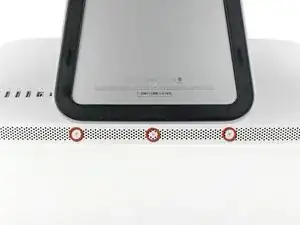
    • Die Klappe ist mit drei Kreuzschlitzschrauben an der Unterseite des iMac befestigt. Drehe sie heraus.

    • Die Schrauben bleiben in der Klappe hängen.

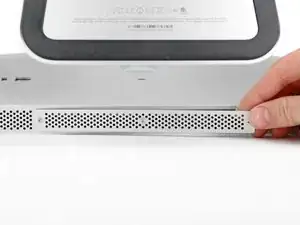
    • Entferne die Klappe.

    Before beginning unplug your iMac.

    Henry Barnett -

    The screws are not phillips #1 as implied above. My phillips#2 bit fit.

    John McWilliams -

    Yes phillips #2 is the correct Bit

    Heath -

    Whenever I go this “deep” into any computer that has a motherboard battery, like the CR2032 for this iMac, I’ll add a new battery to my workflow. I’m in the “neighborhood” anyway.

    The battery is in a spring-loaded compartment, which requires patience and persistence.

    I make sure to test the new battery before installation. (The “3-2-1 Rule” applies: 3 of something means 2, 2 means 1, and 1 means none - I keep spare batteries on hand.)

    When I took part in my dual-drive adventure, I also added a thorough dusting (outside/outdoors) - phew!

    Carrick -

  2. 6Q2NEUXKZVcfN1XK
    6Q2NEUXKZVcfN1XK
    TqcocHbsKGnfFujG
    MMy23aIONs454MXJ
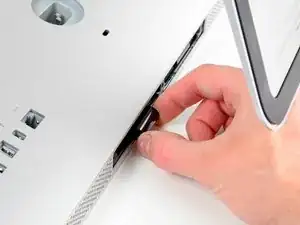
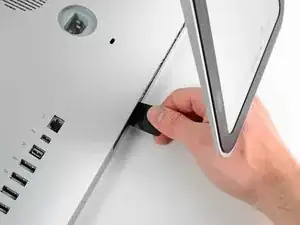
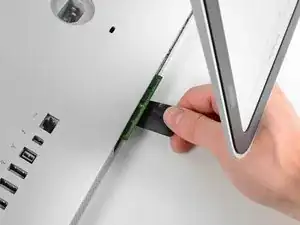
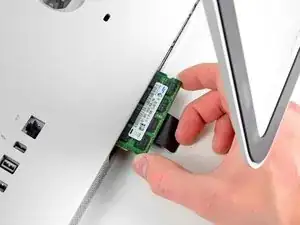
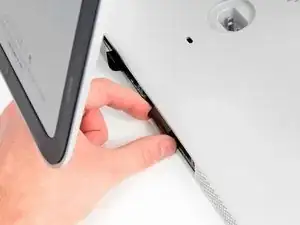
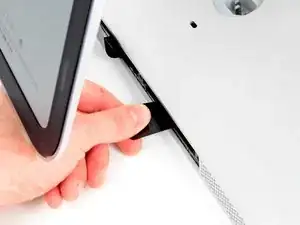
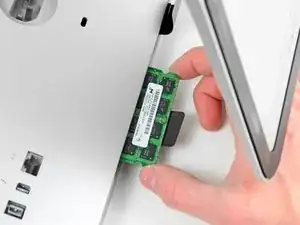
    • Ziehe vorsichtig die schwarze Plastiklasche zum Entfernen der RAM aus dem RAM-Slot.

    • Zieh die schwarze Plastiklasche von der unteren Kante des iMacs weg, um so das Modul/die Module auf dieser Seite des Ram-Gehäuses auszuwerfen.

    • Womöglich ist etwas Kraftanwendung erforderlich.

    It is far harder than I thought you have to pull REALLY hard and then there will be a little click and than you can gently pull out the RAM.

    Alison Newton -

    Press really hard, to the point you think you’ll cut your thumb, you’ll hear a slight ‘click’. If it’s not properly installed, the iMac will ‘beep, beep, beep’ In protest upon booting…

    Brian -

    I found it best to make use of the factory ‘pull tabs’. Much much easier than trying to pull the ram out by hand. It may seem like a good idea but, don’t be tempted to use pliers.

    Brian -

    Just FYI you can install 32GB’s of RAM in this machine. I have been using it this way for over 2 years now.

    Heath -

    Thanks for your Useful guide …. iMac Intel 21.5" EMC 2428 RAM Replacement was performed step by step on my Imac and every thing is perfect right now.

    Jaime Salazar -

    I was able to remove one side of the ram, but the other side would not budge. I was afraid that I was going to rip the plastic tab out of the computer. Any suggestions?

    Paula McCaulla -

    Do you know if 3 ram modules installed would work ? or if it should only be 1, 2 or 4 ?

    I currently have 2x2gb installed, but I only want to add 1x4gb to have 8gb in total.

    Thanks!

    Nikokow -

    Only install 1, 2, or 4. And preferably with the same gb for each module.

    Snuf Box -

  3. ausPCmV1yGbZA5L2
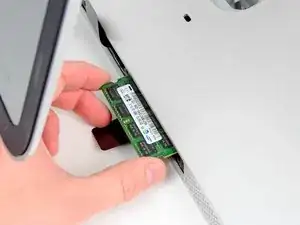
    • Zieh die alten RAM-Module aus den Slots im RAM-Gehäuse und leg sie auf die Seite.

    would this be a good time to increase the size of the RAM too? Would it be as simple as slipping the new RAM in when redoing the steps? Thanks

    timreespt -

  4. OJCMcKYpmsPkSQDx
    OJCMcKYpmsPkSQDx
    eRZJmkuNntfCKEXl
    4FoCqcHqfs4KLHTK
    • Wiederhole die vorherigen Schritte, um das/die RAM-Module von der anderen Seite des RAM-Gehäuses zu entfernen.

  5. dpCmaoqiUSpL1UDy
    dpCmaoqiUSpL1UDy
    MSEtvJqANxwgZxVB
    jrh5rWHixF6uDJyJ
    • Beim Installieren eines neues RAM-Moduls, ist wichtig, auf die richtige Einsetzrichtung zu achten.

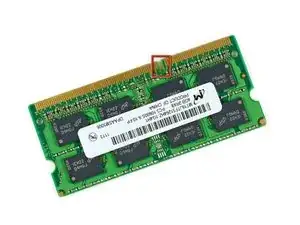
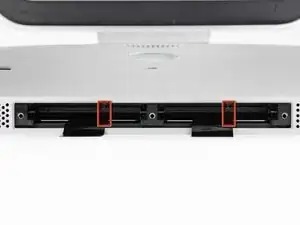
    • Achte darauf, dass die kleine Kerbe in jedem RAM-Modul (siehe erstes Bild) auf die Erhebung im RAM-Slot (siehe zweites Bild) trifft.

    • Dein iMac hat vier RAM-Slots. Achte darauf, jedes RAM-Modul horizontal in seinen Slot zu schieben. Das verhindert, dass sich die Module zwischen zwei Slots verklemmen.

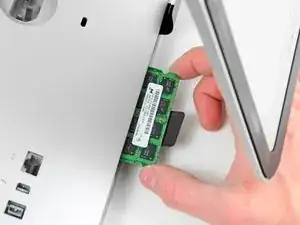
    • Nachdem du die neuen RAM-Module in die richtige Richtung ausgerichtet hast, schiebe sie vorsichtig ganz in den iMac und benutze deine Daumen, um sie sicher in ihren Platz zu fixieren.

    When reinstalling RAM in this machine or any iMac with upgradable RAM slots push hard to get them to go in (Apple really did make this one harder than it needed to be). If you don't push hard it won't go in and your computer won't work. (trust me on this learned the hard way)

    Robert Wacker -

    I am having trouble with bottom 2 slots. As I get beeping sounds when using them. When removed it boots properly. I tried & tried to push the 2 , 2GB ram modules into the bottom slots BUT all get is beeping. Guess I have to settle for 4GB Rather than 8 unless someone has a suggestion.

    Doug -

    Try swapping the to the other slots & don’t forget to press really hard until you hear the ‘click’.

    Brian -

    Is there an expirience to settle 1600 MgH Ram instead 1333 MgH manual required?

    Mikhail B. Bryanskiy -

    The Memory Maxxer RAM upgrade kit for the iMac 12,1 EMC 2428 suggests the machine can run 32 gb but Apple’s website says it can run a maximum of 16 gb.

    Are we sure 32 gb can run on this machine?

    Paul

    steedz -

    Added 16GB for a total of 20GB, runs great, do make sure of the “click”, the beep is disturbing

    Butt Muffins -

    2x2 GB 1333 MHz RAM were installed as delivered. I couldn’t manage to get those two out of their slots. I don’t want to damage anything. So, I put 2x8 GB RAM 1333 MHz RAM bars in the other two empty spare slots to have 20 GB RAM in total. The iMac runs fine with it. As described above, make sure to push RAM until they ‘click’ in completely.

    Matthias Brandl -

    Why are we taking out the RAM modules just to put them back in on the next step ?

    Jesse Fenton -

    Why do we need the spudger?

    Ross -

Abschluss

Um dein Gerät wieder zusammenzubauen, folge diesen Schritten in umgekehrter Reihenfolge.

Walter Galan

675109 Reputation

5 Kommentare

Considering cautions against mixing RAM it would seem my 2009 imac can only be helped by ripping out original 4, 1G Ram modules and replacing with 4 @moreG as "cheapest "way to upgrade which seems ridiculous compared to changing one or 2 modules. Is this another stupidity of our computer world?

Harol Smage

harolds -

Thank you this worked really well!

Reid Fleishman -

When inserted new 2x4GB modules in addition to the original 2x2GB modules to iMac mid 2011, it was only beeping on power off. Tried to swap all module placements around couple of times before they were all accepted. Now with 12GB total ram.

Jozef Kutej -

I'm assuming that I could replace all 4 ram slots with 4x8gb chips above?? Would this work?

iMac (21.5-inch, Mid 2011) 2.5 GHz Intel Core i5

current ram 12 GB 1333 MHz DDR3

I want to replace 2 current chips if not all 4 with this PC3-10600 8 GB RAM Chip

joemangrum -

I have just removed 2 x 2 GB ram modules and replaced with 2 x 4GB?

'Could' the 2x2GB modules be stuck back in also, or no?

Dave heath -