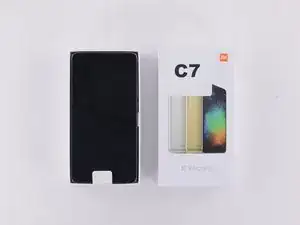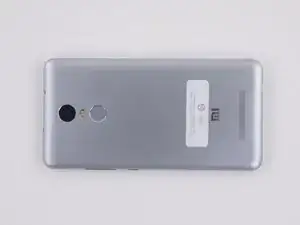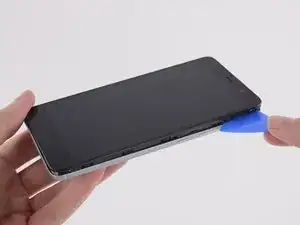
Einleitung

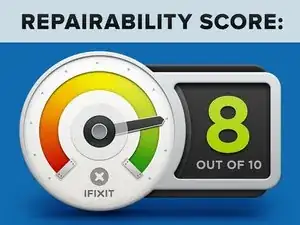
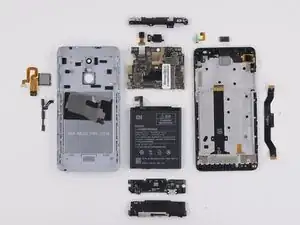
Das Xiaomi Redmi Note 3 ist leicht zu öffnen und der Akku lässt sich leicht austauschen. Es ist fast perfekt zu reparieren, da das Diplay schwer zu ersetzen ist erreicht es nur eine Bewertung mit 8 von 10.

  1. 6fqpeHy6PFMI1soj
    6fqpeHy6PFMI1soj
    FgZGRCIRmQYc3mmk
    kWwaSpIA1QfELhIH
    • Einige Referenzfotos von außen.

  2. TNZr4JLWyh3oLibC
    TNZr4JLWyh3oLibC
    UmrpnuKRR1gaMHwG
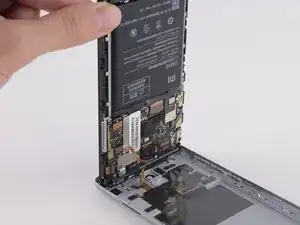
    • Außen gibt es keine Schrauben. Die obere und untere Abdeckung des Rückgehäuses sind aus Kunststoff, können aber nicht vom Gehäuse getrennt werden.

    • Es ist einfach, den Hauptteil des Smartphones aus dem Rückgehäuse zu lösen. Die Plastikrasten, die es festhalten, sind so flexibel, dass sie nicht brechen ohne jedoch zu stark zu sein.

    • Das Kabel des Fingerabdrucksensors verbindet das Rückgehäuse mit dem Inneren des Smartphones. Es ist aber lang genug, dass du es sicher lösen kannst, ohne es zu beschädigen.

    remove sim card tray first.

    NEM0 on PC -

    Not removing them broke the plastic clips - should’ve read your comment 1st - and it should be on the explanation as well! :P

    Demetrio Ruivo -

  3. oejQUBjnsl5pBNiR
    oejQUBjnsl5pBNiR
    RjtOOjfWlmKwbqgq
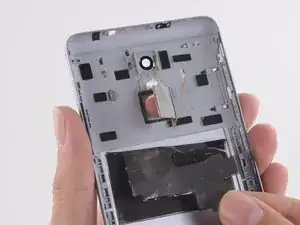
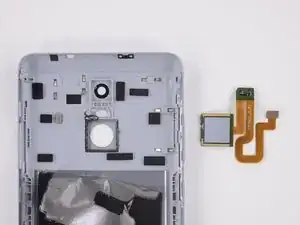
    • Der Fingerabdrucksensor ist das einzig verbliebene Bauteil im Rückgehäuse.

    • Er ist leicht zu entfernen, indem du ihn durch das Rückgehäuse drückst.

  4. tGhkK1fmsaQH3LGm
    tGhkK1fmsaQH3LGm
    qYZNwiZAAOecFgTT
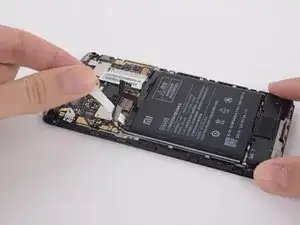
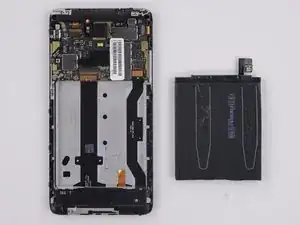
    • Zugstreifen am Akku sind zum einfachen Ausbau des Akkus sehr praktisch.

    • Der Akku ist entfernt.

    I wanted to know how could I improve the battery performance? Is battery-replacement the only way?

    Rgds

    Arun

    00971509820706 (WhatsApp)

    Arun Prakash -

    Where I can find battery replacement

    OMKAR NATH NAYAK -

  5. gEQByGc6R4KbP6Hv
    gEQByGc6R4KbP6Hv
    6WetJ1ILMwHLgabv
    Zv1YeKU3Djfy1nrY
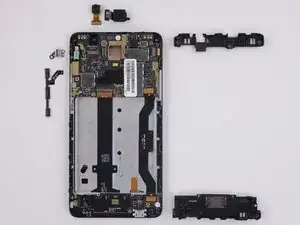
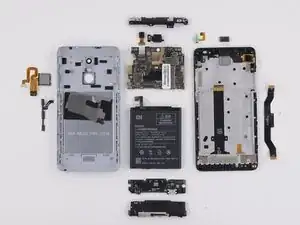
    • Die erste Schicht von herausnehmbaren Bauteilen besteht aus Lautsprechereinheit, Antenne, Tasten, Halterung des Vibrationsmotors, Front- und Rückkamera.

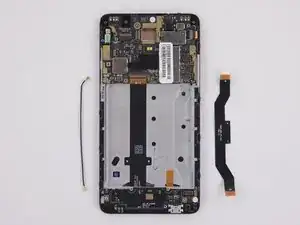
    • Als nächstes sind das Hauptverbindungskabel und der Antennenverbinder an der Reihe.

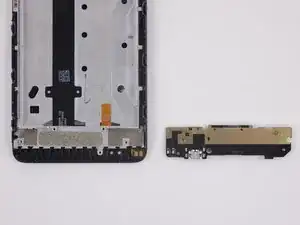
    • Und dann folgt die Tochterplatine mit Ladebuchse.

  6. ZqOB3OgYtIUQqyOa
    ZqOB3OgYtIUQqyOa
    TMjZVD1H4yTTeVSB
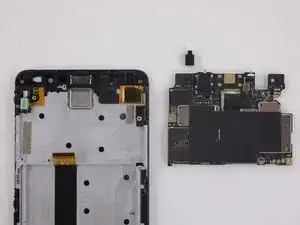
    • Entfernen der Hauptplatine; das einzige Teil, welches von der Hauptplatine gelöst werden kann, ist eine Gummidurchführung für das Mikrofon.

    • Die Hauptplatine ist ziemlich minimalistisch. Leider ist die Ohrhörerbuchse aufgelötet, das macht den Austausch teuer.

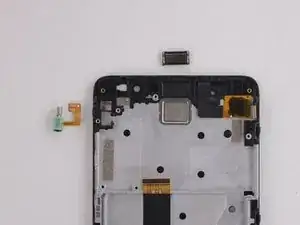
    • Die letzten Bauteile, die von der Displayeinheit entfernt werden, sind der Vibrationsmotor und der Ohrhörer-Lautsprecher.

    • Als letztes kommt die am Mittelrahmen montierte Displayeinheit heraus. Sie ist verklebt, das macht ihre Reparatur zeitaufwändig und teuerer.

  7. rDegXTkTwv6UOSiA
    rDegXTkTwv6UOSiA
    KadcH1xYYX1tDwDQ
    • Das Xiaomi Termin Note 3 verdient eine 8 von 10 auf der Reparaturskala (10 ist am leichtesten zu reparieren):

    • Es gibt zwar keine äußeren Schrauben, trotzdem lässt sich das Rückgehäuse leicht abnehmen.

    • Der Akku ist leicht zugänglich und leicht zu entfernen.

    • Ein modularer Aufbau mit der Ladebuchse auf einer eigenen Tochterplatine sorgt dafür, dass viele Bauteile unabhängig voneinander ersetzt werden können.

    • Die Displayeinheit ist in einem Stück verklebt. Das bedeutet, dass du das ganze Smartphone zum Austausch zerlegen musst.

    • Der Hersteller gibt keine Reparatanleitungen für den Endkunden heraus.

Andrew Optimus Goldheart

Mitglied seit: 17/10/09

484530 Reputation

21 Kommentare

Thanks for this guide. Almost Identical to a Galaxy Note 3 screen replacement. A lot easier than I though it would be.

Clems -

Thank you so much for posting this teardown!

My Redmi Note 3 Pro developed a charging problem, and this post gave me the basics I needed to replace the usb daughterboard.

The phone was acting weird... When plugged in to a charger, the led indicator did not light up. I tried 7 different chargers and cables including 0.5, 1 and 2amp units. What was strange was that when it was plugged into a dual or quad port charger, any other devices stopped charging immediately. Those with led indicators switched off when it was plugged in.

I hoped it was a short circuit or fault in the usb port, which I learned here was replaceable. So I ordered the part on eBay and replaced it myself at home. All up it cost me $11 to fix my phone, and it is now working as normal again.

I'd like to add that one of the screws holding the speaker assembly is hidden under a tiny sticker, and the assembly and usb daughterboard are both also held in place by glue or double sided tape. Lift carefully and they come off quite easily.

Carl Cook -

Where did you buy the usb charging port board (daughterboard)? I have the exact same problem, except the turning off of charging on devices only happens when I bend the charger down slightly. Do you have any problems with mobile data/ calling/wifi and or bluetooth?

Lindsay Tang -

I have a problem with my xiaomi redmi 3 pro, first, my wifi and my bluetooth can't activated, then now my device can't read my SIM card.. What should i do?:(

Vincent Theo -

Hey,I was replacing my charging port and forgot to remove the sd card/sim card slot before opening the case.

I didnt open it all the way,but now my sd card wont load and not just the one I had in when it happened,but any I put in.

What can I do?

please respond

blackdevilonline -

So the screen is fused with the mid-frame/front panel? The clips that hold my back panel on have broken (dont know how as I’ve never taken the back off) so was hoping to simply replace that element of the frame. But if I’m reading this right, it’s actually fused with the screen and I can’t replace only the front/mid frame?

Beau -

Redmi2 my phone problem is in ringtone not change

keturaj suthar -

Hi, i had a problem with my Xiaomi redmi note 3 pro, after replacement of the battery the speaker/loudspeaker dies, no sound in nothing (ringtone, music…). I start to replece the speaker but nothing, after i remove the battery again i take a look and it seems that a Flex cable is damaged (image in step 7, the Flex cable in the right side). The problem is that i can't find where to buy it. Can you help me with that?

Many thanks.

Pedro Serra -

I have a problem with my Xiaomi Redmi Note 3 Pro, my wifi and my bluetooth don’t activate...

What should i do? :(

The Store i bought don’t want to repair even in Warranty, so don’t buy on PowerPlanet, they run from repairs…

hed190 -

Patrón. Cómoborrar

Luis Vaquez -

Retirar el patron

Luis Vaquez -

my redmi note 3 pro no longer recharged after a short circuit of the charger. I tried to replace the USB port with the utmost care and attention, but the phone does not recharge anyway. What else could have burned? And to replace the battery or something on the motherboard that makes it impossible to repair? Mario Frianu

Kit Carson -

Thank you so much for such kinds of information.

I got everything here what I needed to know, except one thing that is most important to me is repairing guidance,please post at least one about a more ICs having phone repairing and especially network section

Athar -

What is the spare part to receive the signal from the sim card?

mariasavarese -

Mi note 3 3,32gb phone water damage, mobile logon any time but no logon completely plz solutions

mukrram ali -

I followed the guide and removed my battery, it went fine I think. But maybe I damaged something, because my phone don’t boot. I only see MI logo if the charger is in and then nothing. Any tips?

Kate Purr -

Can i ask what is number of wifi ic of xiaomi note 3 SD version ??

Yasser seleem -

Sim tray is stuck. It comes out just a little bit. Will disassembling the phone help?

Anshuman Panda -

Pls help me, my phone after a reboot the digitizer stop working.I turn off the phone and not turn on for 2-3 week and it works again but if i turn off/reboot it ‘ll stop working .

I had problem in turning on wifi and bluetooth and my sim card couldn’t be read too.

Cookies -

Please help…

Last year my Redmi Note 3 stopped working suddenly.

It wont boot when not plugged it

The battery stopped taking charges and shows a screen I dont understand.

It shows a battery icon with a energy icon, LED is red

It still does not work after reconnecting the battery

If I try many times, it just bootloops

Please help, this is a birthday gift from my grandmother

Yeo Gamez -