Einleitung

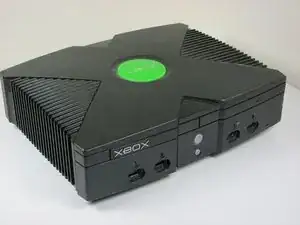
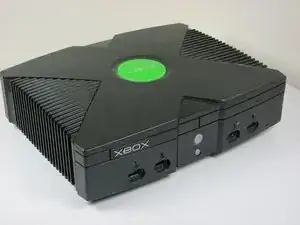
Diese Anleitung zeigt dir, wie du die Festplatte austauschen kannst.

  1. DAWYeQTbJIyRE44H
    • Ziehe den Stecker und stelle die Xbox auf eine ebene und stabile Oberfläche.

  2. jG2uJZqNF5OSgIoi
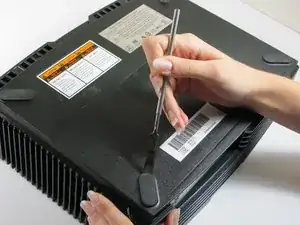
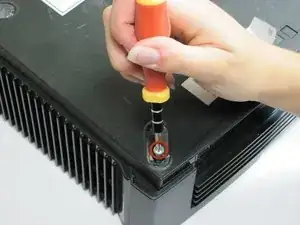
    • Drehe die Xbox um, so dass die vier Gummifüße sichtbar werden.

    • Hebele die vier Gummifüße mit einem Spudger heraus.

    The screw is in the outside corner. If you pry up only the half of the foot on that side, you can easily remove the (very long) screw, and the foot will stay attached.

    Ian Butler -

    Ah I always used to damage the feet.

    Andrew Veiga -

  3. CNc1f5HgbfeLyU6V
    CNc1f5HgbfeLyU6V
    Fkv25vcmRjCqx11G
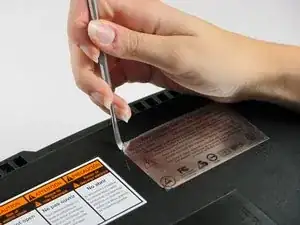
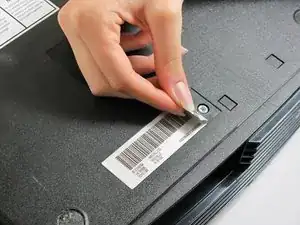
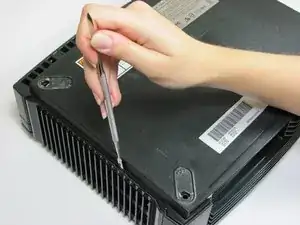
    • Zwei weitere Schrauben sind unter den beiden Aufklebern unten am Gehäuse versteckt.

    • Du kannst entweder die Aufkleber ablösen, oder fühle durch die Aufkleber nach den Schraublöchern und stoße dort Löcher hinein.

    It is also easy to feel for the screw hole with your finger and then cut a hole, or punch it out with the tip of the Torx driver to reveal the screw.

    Ian Butler -

  4. yrHWicQWhkLfIroI
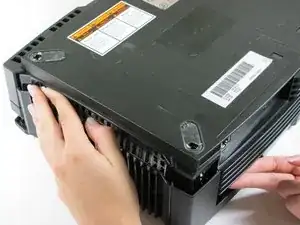
    • Entferne die sechs Torx T20 Schrauben, welche die obere Abdeckung an der unteren Abdeckung befestigen.

  5. ZX6cAaLmgKaBWgXk
    ZX6cAaLmgKaBWgXk
    enjJvfq3TVCgp4iJ
    • Zwänge einen Metallspatel dazwischen und hebele vorsichtig nach oben, um obere und untere Abdeckung etwas zu trennen.

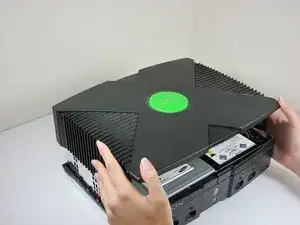
    • Drehe die Xbox mit der rechten Seite nach oben.

    • Halte die Xbox fest und hebe die Xbox ein wenig hoch. Durch leichtes Schütteln des Gerätes sollte sich die obere Abdeckung vom Rest des Gerätes lösen.

    • Wenn du die Xbox auf deine Knie legst, wenn du die Abdeckungen löst, geht es vielleicht noch einfacher.

  6. HWBO3akf3JrTpItt
    HWBO3akf3JrTpItt
    QSGAQlPuDMAd4lyt
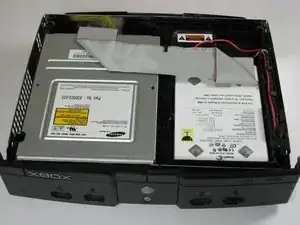
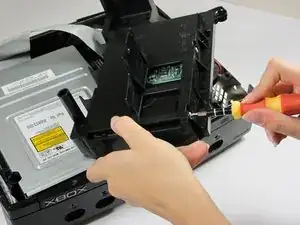
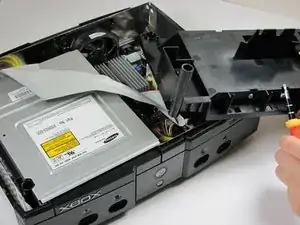
    • Wenn die obere und untere Abdeckungen gelöst sind, dann stelle die Xbox vorsichtig mit der rechten Seite nach oben und entferne den oberen Deckel.

  7. tPN4vdeeZKl1I1rZ
    tPN4vdeeZKl1I1rZ
    g4NJhsK3pDOWGQkB
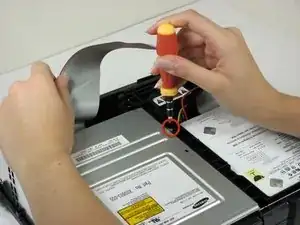
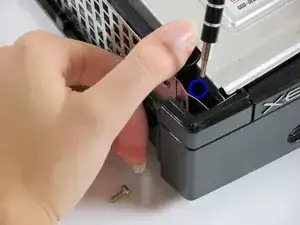
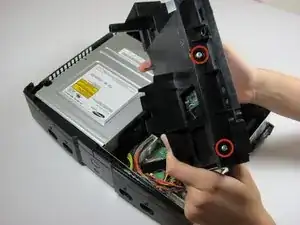
    • Entferne die drei 3 mm Torx T10 Schrauben, welche die Festplatte an der Xbox befestigen.

    • Es gibt eine Schraube hinten links an der Festplatte, die nur sichtbar ist, wenn das IDE Kabel hochgehoben ist. Die anderen beiden befinden sich vorne links und rechts an der Festplatte.

    • Die Schraube in der linken unteren Ecke der Festplatte befindet sich nicht in dem Loch, in dem sie zu sitzen scheint, sondern noch etwas näher an der Ecke.

  8. 1fXjrAGgWWybWvHI
    1fXjrAGgWWybWvHI
    A2OccKgygJyyMSuP
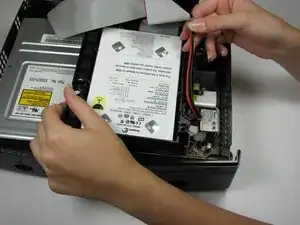
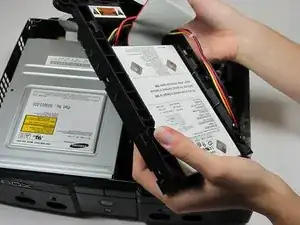
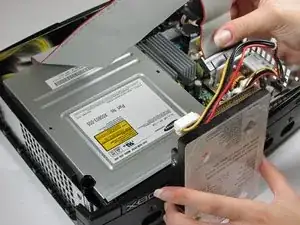
    • Ziehe das Versorgungskabel der Festplatte aus dem Halterung heraus, so dass genug Spiel zum Entfernen der Festplatte entsteht.

    • Hebe die Kunststoffhalterung der Festplatte aus dem Gehäuse der Xbox heraus.

  9. 2DKHk4nEpggCoB3R
    2DKHk4nEpggCoB3R
    k1Kyg6JejwYtJREe
    PJVDyrRyKbsR22CB
    • Entferne die vier 33,4 mm Torx T15 Schrauben von der Kunststoffhalterung der Festplatte. (Zwei auf jeder Seite)

    • Entferne vorsichtig die Festplatte aus der Kunststoffhalterung. Wenn du vorsichtig ein wenig ruckelst, wird die Festplatte leicht herauskommen.

  10. hIptJJoxao2CLYaT
    hIptJJoxao2CLYaT
    huhJSci5P4rvoDnU
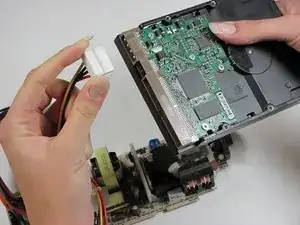
    • Ziehe das Datenkabel und Versorgungskabel gerade von der Festplatte ab.

    • Sie sitzen möglicherweise ziemlich fest, sei also vorsichtig. Ziehe dabei nicht an den Drähten, das kann die Kabeleinheit beschädigen.

    Remember that the new drive will only work if it has been properly prepared, and the Xbox has been modified.

    Ian Butler -

    there is NO way to legally replace the xbox hard drive. it is LOCKED to the motherboard and the xbox will not boot to the OS or make it past the BIOS if the HDD is not the one that came with it from the factory. you MUST use a mod chip and “home brew” to do a HDD swap and expect it to work

    James Vawter -

    Could you point me to a good tutorial on using a modding an original Xbox? All I want to do is swap an HDD in original Xbox with another original Xbox HDD because I want my saved game data. Any way to figure this out? Seems like modding is a !&&* of a burden.

    michaelaugustin2000 -

    Can i replace the original hard drive with new one

    Andrew Veiga -

Abschluss

Um dein Gerät wieder zusammenzusetzen, folge den Schritten in umgekehrter Reihenfolge.

rmarstel

Mitglied seit: 29/10/09

5053 Reputation

16 Kommentare

can you replace the hard drive with one that has windows or linux on it and run windows or linux from the hdd and turn the xbox into a media pc or is the xbox OS not in the hdd but in a chip on the motherboard that cannot be overridden so that it boots from the hdd

alexander matthiessen -

NO, you cannot.

kaos_engr -

kaos_engr is wrong. You CAN run Linux on a modded Xbox. Although since you also asked about REPLACING the hard drive: I don’t know whether you have to use the original hard drive or can use any IDE hard drive. But Linux is apparently possible on a modded Xbox. See here, and there are more resources on the web too, just search the web for “original Xbox linux”: https://en.wikipedia.org/wiki/Xbox_Linux

As for Windows on an original Xbox. I’m sure I read once that proper drivers wouldn’t exist. Because nobody would have written them. Certainly Microsoft didn’t want you putting Windows on your Xbox. However I just came across this video of someone allegedly running Windows 98 on an Xbox. I’m not sure if they’re somehow virtualising Windows using Linux or something. Maybe have a look and figure out what’s going on: https://www.youtube.com/watch?v=erk_XE-D...

But Linux on an Xbox does look possible, IF you have a modded Xbox.

D C -

http://www.ebay.com/gds/How-To-Determine...

Utilize the information on this website to determine what Xbox version you have so you know what replacement parts to look for.

Navy Vet 2015 -

The repairability score varies on the model...

Stephen Kymn -

greetings- we have an Xbox One that is out of warranty. The Xbox wont turn on. We have replaced the power brick & it still wont turn on. We think the hard drive crashed. Orange light is on on power brick. Should we try to replace the hard drive?

wallis -

Is it an original Xbox, Xbox 360 or the latest Xbox One? Very poor naming of the consoles on Microsoft’s part. Most used to call the original 2001 released Xbox the Xbox 1 after the Xbox 360 was released and now there’s the Xbox One (spelled out) and Xbox One S and Xbox One X. (Argh!!)

Power brick (external power supply) was on the Xbox 360 or Xbox One not the original Xbox. The original Xbox’s power supply was self-contained.

kaos_engr -

This Xbox Hard Drive Replacement Guide mentions nothing about the ATA security employed by the original Xbox’s firmware that prevents easily swapping drives between different consoles. Without first unlocking and relocking the HDD to the new console’s motherboard (HDDKey), you cannot just swap HDDs from one to another.

kaos_engr -

This Xbox Hard Drive Replacement Guide mentions nothing about the ATA security employed by the original Xbox’s firmware that prevents easily swapping drives between different consoles. Without first unlocking and relocking the HDD to the new console’s motherboard (HDDKey), you cannot just swap HDDs from one to another.

kaos_engr - May 9

best comment so far swapping any xbox hard drive may it be the original xbox, xbox 360 etc is not as simple as this guide made it to be.

TavarChynn -

That's because the guide is incomplete. You need a soft nodded Xbox and y splitter cable for hot swapping

Darren Owen -

Missing important step(s): How to prepare the new HDD so that the XBOX is working again. Or does an empty HDD is enough?

Harald-René Flasch -

How do you remove the non-ribbon cables from the hard drive? Not all of us know how to work these plastic caps :/

Cooper Stevenson -

Tengo el error 8 como puedo solucionarlo

Akel yeeaaah -

Before attempting this please keep in mind that the hard drive is locked to the motherboard. You can physically replace it, but you will simply get an error code when you boot. You will need to mod your system in order to boot off of a replacement hard drive.

MP3 -

there is NO way to legally replace the xbox hard drive. it is LOCKED to the motherboard and the xbox will not boot to the OS or make it past the BIOS if the HDD is not the one that came with it from the factory. you MUST use a mod chip and “home brew” to do a HDD swap and expect it to work

James Vawter -

What size of hard drive do you need for the replacement

Wyatt Phillips -