Einleitung


-
-
The back of the phone is held on with a combination of plastic clips and adhesive.
-
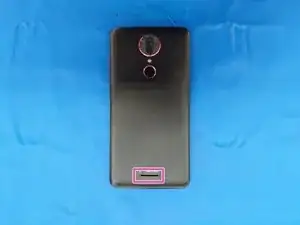
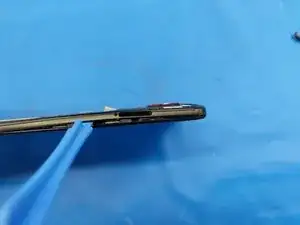
The entry point is the speaker grille near the bottom of the phone. Be careful not to insert the opening tool directly downward to avoid damaging the speaker.
-
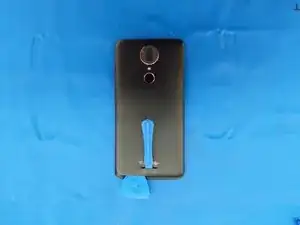
Insert a plastic opening tool in the hole in the back of the phone as shown to lift the back cover.
-
Insert a guitar pick to keep the plastic cover lifted.
-
-
-
Work a guitar pick or opening tool around the edges of the back panel to disengage all clips.
-
There is adhesive around the edges of the back panel as well as around the camera.
-
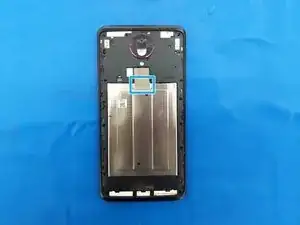
Insert the hook of a Halberd spudger into the small opening above the plastic part covering the fingerprint sensor and pry it off while covering it so it doesn't go flying away.
-
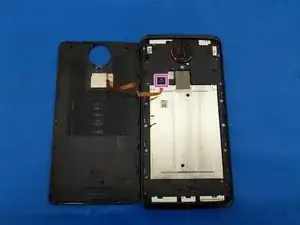
Disconnect the fingerprint sensor flex cable with the flat end of a Halberd spudger or an opening pick and set the back panel aside.
-
-
-
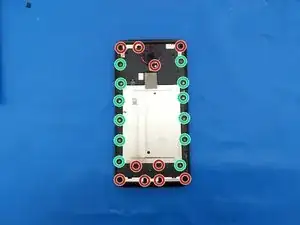
Remove 10 black Philips screws (including one covered by a white sticker below the camera lens).
-
Remove 12 silver Philips screws.
-
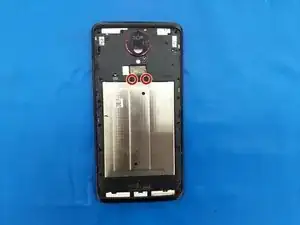
Gently peel up the bottom half of the metal tape to reveal...
-
Two more black Philips screws to remove.
-
-
-
The midframe is held on by strong plastic clips around the edges of the phone. Insert an opening tool or pick as shown near the SIM card slot
-
Ensure that all screws have been removed, then work your way around the edges of the phone.
-
Clips near the corners are particularly strong.
-
-
-
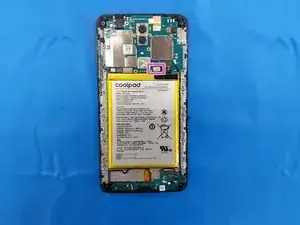
Disconnect the battery flex cable.
-
The battery is held in by 3 vertical strips of adhesive. Use rubbing alcohol and/or heat to soften the adhesive.
-
To reassemble your device, follow these instructions in reverse order.