Einleitung
Removing the battery.


-
-
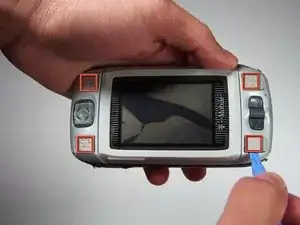
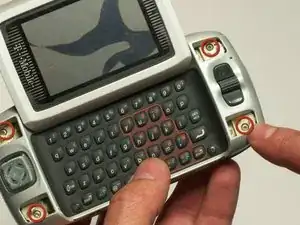
Use the plastic opening tool to remove the 4 buttons on each corner of the Sidekick.
-
Gently pry open button and remove button.
-
Do this for each of the 3 buttons remaining.
-
-
-
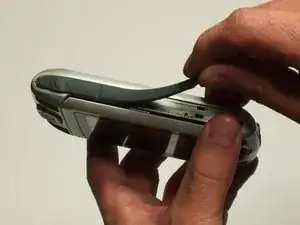
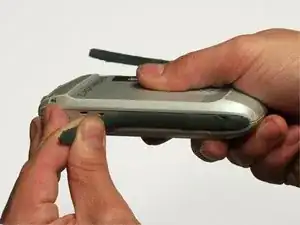
The bumpers on the top and bottom of the phone can be removed by simply "peeling" them off.
-
-
-
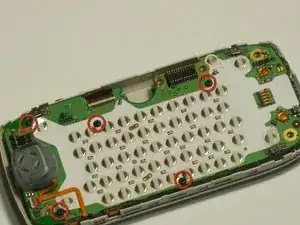
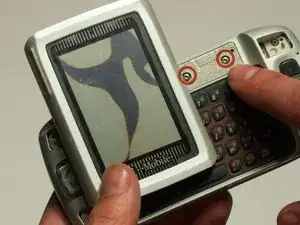
Use the T6 Torx Screwdriver to remove the 4 screws that are underneath the 4 buttons you removed in step one.
-
-
-
Flip the screen up halfway (90 degrees), to reveal the 2 screws above the right side of the keyboard.
-
Use the Torx 6 screwdriver to remove these 2 screws.
-
-
-
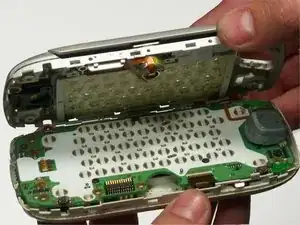
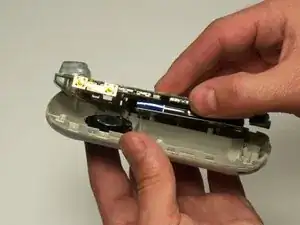
After removing the 6 screws and both bumpers, the phone will be easy to separate into the two main bodies.
-
You can use your hands to simply pull apart the top casing from the bottom casing.
-

Ein Kommentar
I have the battery out. Is their a way to check if it holds a charge? when I plugged charger into sidekick nothing lit up? is it a battery problem or a charge issue? The phone was never damaged. like the rest stop using it so died. figured battery is toast. this was a replacement tutorial. but doesn't show new battery going in to make sure you did correctly. I need the text messages and other data from my phone pretty bad. any help greatly appreciated.