Einleitung

Wenn sich dein Samsung Galaxy Tab 2 10.1 Tablet nicht mehr einschalten lässt, hilft vielleicht der Austausch des Akkus. Dies wird hier gezeigt.

Achtung: auf einigen Bildern wird ein Metallspudger verwendet. Benutze lieber einen starken Spudger aus Kunststoff, um Schäden zu vermeiden.

Eine Übersicht über verschiedene Arten von Verbindern gibt diese Seite.

  1. gFITfxonX2HMHZOe
    gFITfxonX2HMHZOe
    kTZRPMMBi2CpdGYK
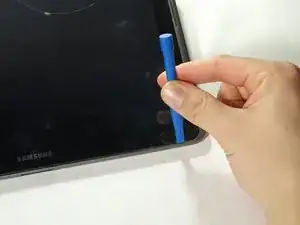
    • Ein Plastiköffnungswekzeug ist bei diesem Schritt vielleicht zu schwach. Benutze lieber einen starken Spudger.

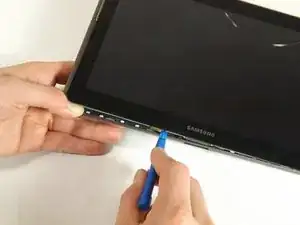
    • Setze das Werkzeug zwischen Glasscheibe und Rückteil rin, so dass der abgewinkelten Teil unter dem Glas ist. Hebe das Rückteil vorsichtig weg von der Scheibe.

    • Achte darauf die ganze Displayeinheit abzutrennen und nicht nur die Glasscheibe vom Display. Du musst das Werkzeug etwas tiefer einsetzen.

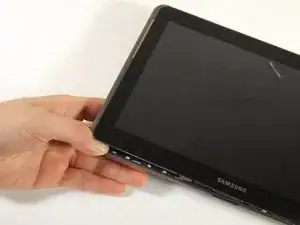
    • Arbeite dich rings um das ganze Gerät und trenne das Rückteil ab.

    Note that the headphone port protrudes into the back cover framing. Hence the rest of the back needs to be unclipped and taken off first.

    Levi Howard -

    I had problems getting it to separate at first. Pushing down with my thumb on the very edge of the case from the front while pushing up with my fingers from the back flexed it enough to get a very small jeweler’s screwdriver in the gap. From there I worked it until I could get the little bread wrapper plastics clips in the space. When it needed something stronger a 1 or 2 inch plastic putty knife from Walmart did the trick.

    William H Bowers -

    I replaced the battery and nothing no screen nothing. the batt was 3.7 V though.

    The old one had 0V. I might have messed up the ribbon cables?

    I put back the cover on it.

    Held on the power button for 10 seconds, nothing. Held the power button and the volume up button for 10 seconds… also nothing..

    I am leaving it charge for a while now. Even though if your battery is like full (3.7V measured) it should come on… but nothing..

    Lets wait and see. Or this will be garbage…

    xbox40489 -

  2. 1g3y2yOqJjJck1Dg
    1g3y2yOqJjJck1Dg
    oJO4HEU4bsAaRJsG
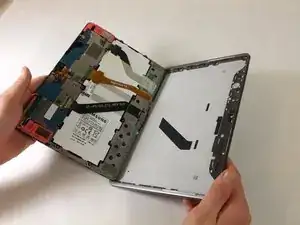
    • Hebe den Bildschirm mit den Fingern vorsichtig an.

    • Wenn er sich nicht vom Rückteil löst, dann fange noch von vorne an.

  3. RqrTUOPD12Zi5S65
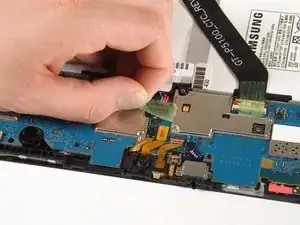
    • Entferne mit den Fingern das grüne Klebeband, welches den Akkuanschluss bedeckt.

  4. wNuHmegqX4HYSwKp
    wNuHmegqX4HYSwKp
    qNMIBoda1gdI6iUG
    YSkPPCkxgFKqlrlG
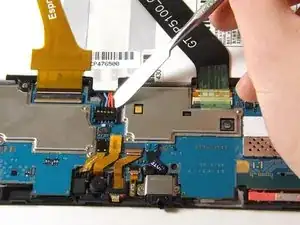
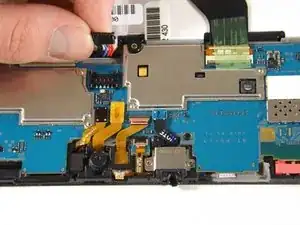
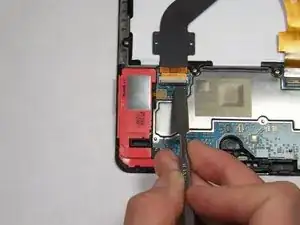
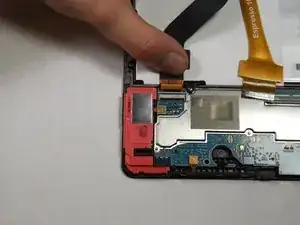
    • Setze den Spudger zwischen die Drähte und unter den Verbinder. Hebe den schwarzen Stecker vorsichtig hoch und löse den Akkuanschluss von der Hauptplatine.

    • Der hier gezeigte Metallspudger wird dafür nicht empfohlen, er könnte einen Kurzschluss verursachen. Benutze statt dessen lieber ein ESD-sicheres Werkzeug, z.B. einen starken Spudger aus Kunststoff.

  5. fwy6K5V3oxDJ2TGA
    fwy6K5V3oxDJ2TGA
    wUNqG5yv4KUjVILV
    11sN5Mi1oY63e5VS
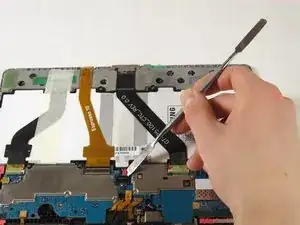
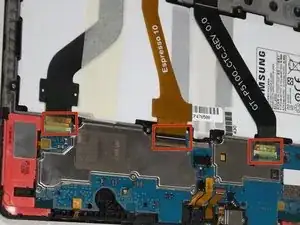
    • Entferne mit den Fingern das grüne Klebeband, welches die drei Flachbandkabel nach unten hält.

    • Klappe die Sicherungsbügel an den drei Verbindern mit dem flachen Ende des Spudgers hoch. Fange mit dem schwarzen Flachbandkabel ganz links an , gehe dann zu dem goldenen Flachbandkabel und anschließend zum schwarzen.

    • Ziehe die Flachbandkabel vorsichtig mit den Fingern aus den Sockeln heraus.

  6. YcXBOvouU1CLUeeI
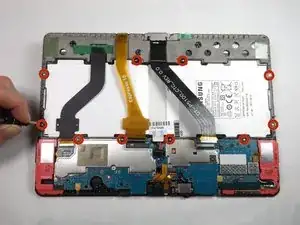
    • Der Akku ist mit zehn 3 mm Kreuzschlitzschrauben #000 befestigt. Drehe sie heraus.

  7. UKYXAPdqdqXW3H5d
    UKYXAPdqdqXW3H5d
    L6lmuWEVJst3SEm6
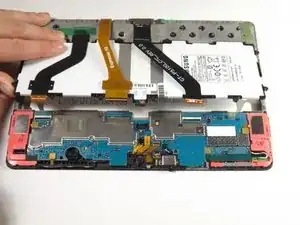
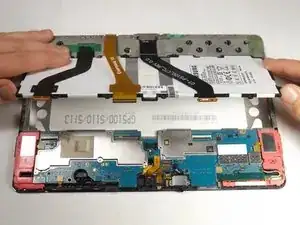
    • Hebe den Akku mit den Händen hoch und aus dem Tab heraus.

    It would be helpful to advise that the headphone port protrudes and hence the back needs to be taken off with that in mind (ie, the rest of the back first)

    Levi Howard -

    trés bonnes explications…. Changement de batterie réussi MAIS impossible de remettre les nappes en place…Craignant ce problème je n’avais pas débranché celle du milieu; la batterie glisse dessous….J’aurais du le faire pour les autres! La tablette va à la déchetterie!

    5puy32@orange.fr -

    I replaced the battery and nothing no screen nothing. the batt was 3.7 V though.

    The old one had 0V. I might have messed up the ribbon cables?

    I put back the cover on it.

    Held on the power button for 10 seconds, nothing. Held the power button and the volume up button for 10 seconds… also nothing..

    I am leaving it charge for a while now. Even though if your battery is like full (3.7V measured) it should come on… but nothing..

    Lets wait and see. Or this will be garbage…

    xbox40489 -

Abschluss

Um dein Gerät wieder zusammenzusetzen, folge den Schritten in umgekehrter Reihenfolge.

Daniel Rostom

Mitglied seit: 02/02/15

795 Reputation

9 Kommentare

I changed my battery and also the charging port/ribbon cable..... Could someone help me figure out why it still won't show anything on screen or turn on ? It's never been dropped, started having a problem with charging issues so decided it must be battery, port, or charger. So I bought all three and still no change ? help!!

K W -

Sorry I don't have any help for you, but it sounds like I am having the same issue as you. Please let me know if you solve your problem.

mooseintheuk -

Does this really work?

Cristopher Arias -

How to check charging voltage o battery terminal .

naveedstc -

Hello KW

Please go through in service manaula available on net and follow step by step like as

1- if have battery voltage more than 3.7 it meas your battery is OK and then go next step

2- check conenctor FPCB(SLC500) is fixed properly.

3- check voltage on ZD500 volagte when you press the on -off swicth ZD500 Voltage

have to same V_BATT voltage if no then replace power swicth .

4- Please Check U700(PMIC) and Power

on voltage(C760≥1.0V, C758≥

1.1V, C757≥1.0V, C755≥1.0V,

C754≥1.2V, C753≥1.35V,

C752≥2.0V) if volagte is not OK then replace U 7000.

good luck

naveedstc -

I have that tablet for 5 yrs now and it started to give me problems 3 yrs ago and at obe point it went dead… then it cameback but is really slow and it freezes… do battery replacement works??? Tks. Liette

lsaintamand42 -

Do replacement battery work if tablet is 5-6 yrs old???

lsaintamand42 -

I had a problem with my Tab “ 10.1

I was silly enough to let the battery drain completely.

The result was that when i tried to charge it, I got the charging logo, followed by the battery symbol, but instead of filling the symbol with gold bars, only one gold bar was displayed for about second, before the tablet shut down.

The tab would repeat this cycle over and over again, regardless of how long I had it plugged in to the charger (over 24hrs)

I followed the above instructions, left the battery in place, but disconnected it from the motherboard for minute or so.

Once reassembled and plugged back in to the charger, the tab started charging as normal right away

Many thanks to the author for a fantastic 15 minute fix

ATB

Russ

Russell Greenacre -

I replaced the battery and nothing no screen nothing. the batt was 3.7 V though.

The old one had 0V. I might have messed up the ribbon cables?

I put back the cover on it.

Held on the power button for 10 seconds, nothing. Held the power button and the volume up button for 10 seconds… also nothing..

I am leaving it charge for a while now. Even though if your battery is like full (3.7V measured) it should come on… but nothing..

Lets wait and see. Or this will be garbage…

xbox40489 -