Einleitung
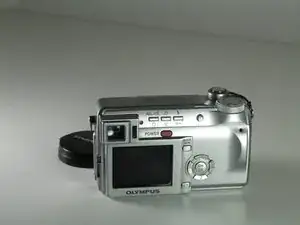
Over time, the LCD screen can be damaged. This guide shows the relatively easy process for replacing the display on the Olympus C-765.
Werkzeuge


-
-
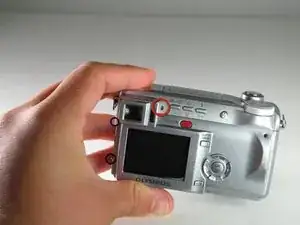
Remove all the screws using your Phillips #00 holding the back plate in place. This includes:
-
On the Back: Unscrew the 4mm screw to the right of the viewfinder.
-
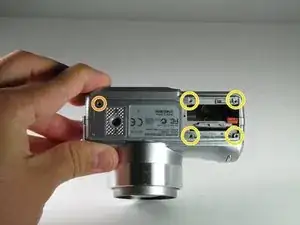
On the Bottom:
-
Unscrew the 3mm screw in the top left corner.
-
Unscrew the four 3mm screws under the battery cover.
-
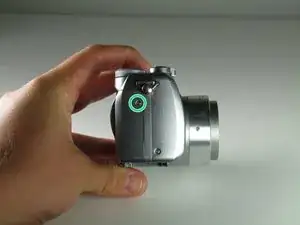
On the Right Side: Unscrew the one 3mm screw holding the right-side panel.
-
On the Left Side: Unscrew the two 2mm screws holding the left-side panel.
-
-
-
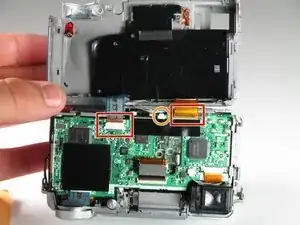
After you remove the back cover:
-
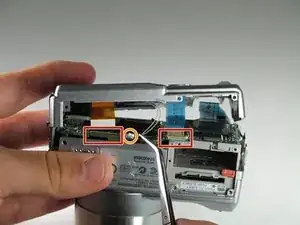
Gently pull the two ribbon cables out of their sockets.
-
Gently disconnect the white cable.
-
-
-
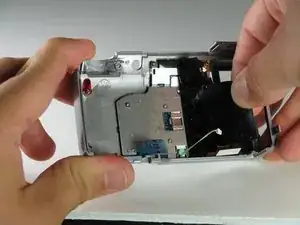
Peel the black tape off the back of the LCD.
-
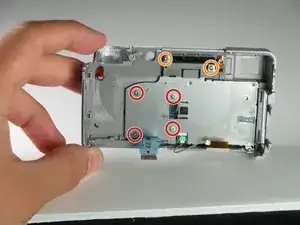
Using the Phillips #00 remove the four 3mm screws on the LCD bracket.
-
Remove the two 2mm screws from the top of the bracket.
-
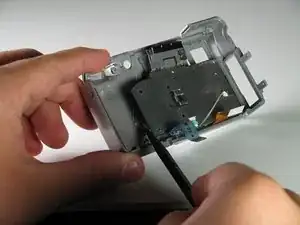
Use a spudger to pop the LCD screen out of the camera’s backplate.
-
To reassemble your device, follow these instructions in reverse order.

The bullets on this step apply to the 3 pictures included in this step
Cynthia -