Einleitung

  1. NgUFSENbLNL5TOFu
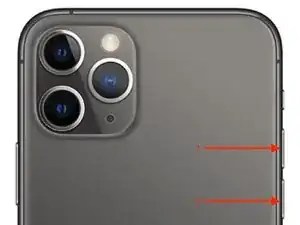
    • Drücke kurz die Lauter-Taste (1) und lass sie wieder los.

    • Drücke kurz die Leiser-Taste (2) und lass sie wieder los.

    • Man muss wirklich nur ganz kurz drücken.

    Thank you so much! This truly worked! We didn’t know what to do with my phone when it froze this was a life saver more importantly because customer service closed earlier! Thanks again

    Marco Jackson -

    So my question is do you do this simultaneously?? Or one at a time?

    jameciahardy -

    this worked, but had to do it a few times, phew ! Thanks

    lise bourgeois -

    okay i see the coment everyone says it working but i pressed them down and nothing showed up .please respond

    Ernest Toth 11 Clifton -

    i’ve done this many times nothing happens need phone traveling in the morning

    kjmil54 -

  2. GwwdhhmItipOYGAd
    • Als letztes, halte die Seitentaste (3) gedrückt, bis das Apple-Logo erscheint und lass sie dann los.

    Und wenn das iPhone auf Tastendruck nicht reagiert?

    Peter Hellweg -

    Thanks. Finally I got my frozen phone to shut down. Instructions on another site didn’t say to press and release the volume up then down buttons quickly, then the sleep/awake button. That seemed to make all the difference.

    Joe P -

yvaneck

353226 Reputation

12 Kommentare

Klappt - vielen Dank:-)))

Marlene Dietrich -

This Worked! Thank You so much!

Ashonda Warner -

❤️Many thanks

angelamacuser -

Still not working

stephen fleming -

still didnt work

steve doddridge -

same im trying a million times and nothing

Ernest Toth 11 Clifton -

still not working

Veronica Pellino -

It worked perfectly!

Dawn McVey -

still didnt work

Gina DeMeo -

help me please

Gina DeMeo -

Thank you! I have never had an app freeze like that.

Wanda Kalencki -

der Tipp, nur ganz kurz zu drücken, war ausschlaggebend. Vielen Dank, Iphone wieder okay!

Catrin Geerdes -