Einleitung

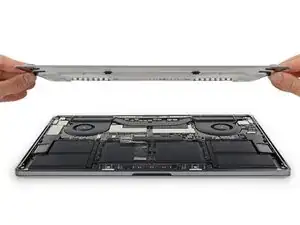
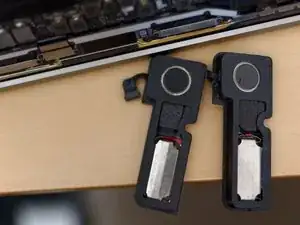
Diese Anleitung zeigt, wie du die Lautsprecher in den MacBook Pros von 2016 und 2017 tauschen kannst. Oktober 2016 kamen die neuen MacBook Pro raus, samt komplett neuem Design und Funktionen wie die Touch Bar, einer neuen Butterfly Tastatur, einem neuen Display und neuen Lautsprechern. Diese Neuerungen verärgerten viele Nutzer, weil sie sehr anfällig waren. Apple kündigte zwar ein Austauschprogramm für die Tastaturen und die Displays an, aber nicht für die Lautsprecher, bei denen viele Nutzer ein Problem mit der Umhüllung haben. Laut Apple kostet der Austausch der Speaker 600$, weil man das gesamte obere Gehäuse mittauschen müsste. Also habe ich beschlossen, sie selbst zu tauschen und diese Anleitung zu schreiben.

  1. 52KismmSPdOAAhLn
  2. YwFmBvarCXUhRgNL
    YwFmBvarCXUhRgNL
    twiJYUNgfyNSSgSc
    oIbYRTOoEA1GYLRT
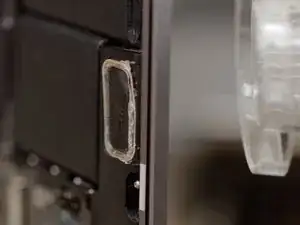
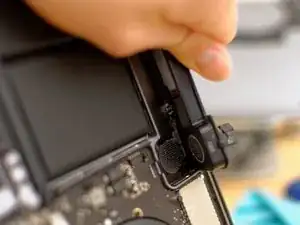
    • Der Lautsprecher ist wirklich fest an das Gehäuse geklebt, deshalb habe ich es mit einem Fön aufgeweicht, um ihn abzubekommen.

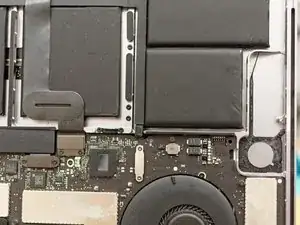
    Step 1: CAREFULLY unlatch the cable connection to the motherboard.

    Damon Hamm -

    Slide a thin sparger underneath the cable starting from the direction of the fans and towards the batteries. The connector lifts straight up to disconnect

    Damon Hamm -

    Does not show how to disconnect speaker from motherboard. Thanks.

    Richard Carey -

  3. t6FdjqG4HJtNVuJL
    t6FdjqG4HJtNVuJL
    kpMq3nbeSQtmnJG1
    • Schiebe danach ein metallnes Lineal zwischen Lautsprecher und Gehäuse. Sei wirklich vorsichtig mit dem Akku.

  4. YgE4rE1mgujDKxkk
    YgE4rE1mgujDKxkk
    ChCL1rcyAG1rqtM2
    TLs2KU2dpXtXfpDn
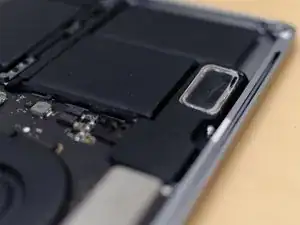
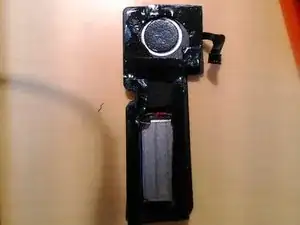
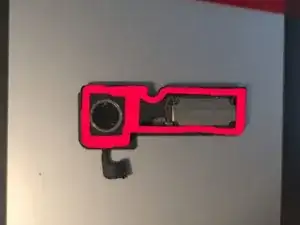
    • Ich habe für meinen Ersatz doppelseitiges Klebeband benutzt. Das wichtigste in diesem Schritt ist, keine Lücke beim Ausschneiden und Aufkleben auf dem Lautsprecher zu lassen. Selbst die kleinste Lücke macht den Klang kaputt.

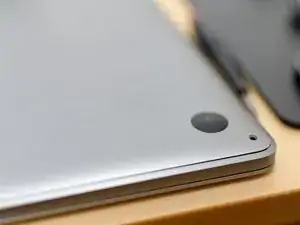
    • Hier sind die Unterschiede der Modelle von 2016 und 2017 zu sehen. Der Lautsprecher rechts ist ein 2017er Modell, der links das 2016er Modell von iFixit. Im dritten Bild ist zu das sehen, dass sich der Schaumstoff zur Schallabsorption ein wenig geändert hat, ich weiß allerdings nicht, ob das was am Klang ändert.

    Bei mir ist sogar der originale Kleber genau richtig im Gehäuse kleben geblieben.

    Ich habe Ihn dann nur nochmal mit dem Fön erwärmt und den neuen Lautsprecher feste (und vorsichtig) daraufgeklebt.

    Andreas Martin -

    welche Kleber kann man benutzen?

    Adolfo Leyh -

Abschluss

Ein paar Monate nach diesem Austausch wurde mein Akku so schwach, dass ich damit zu Apple ging. Sie tauschten das gesamte obere Gehäuse inklusive des Akkus und der Lautsprecher. Aber ich befürchte, dass die neuen Lautsprecher bald kaputt gehen, sie machen ein krächzendes Geräusch.

Takashi Miyazaki

Mitglied seit: 13/01/19

1064 Reputation

20 Kommentare

is battery draining is related to speaker replacement? as I get it’s not, but just wanted to double-check

I’ll need to do the same replacement after I’ve damaged my speaker when I was opening my MacBook to change thermal paste, so great news you can change to case after a repair like that, thank you

Dmitry Petrov -

Has anyone done this repair and what there any problems?

Charles Lampard -

Are these speakers located directly under the back /bottom cover? I have the MacBook Pro (15-inch, 2016) touch bar and I see in some videos people going through so many steps trying to get to them so I’m a little confused by this 3-step tutorial.

Seba KL -

Where can I buy the right-side speaker component, 2017 model? As you noted in the 3rd step section, you find the structural differences between 2016 and 2017models. When I search the 2017 model right-side speaker in ifixit. com here, the component seems to be only 2016 model as below:

MacBook Pro 15" Retina (Late 2016-2017) Right Speaker

Also, do you have a video tutorial of replacing speakers? If then, much appreciated!

Kyungil Kong -

Sorry I didn’t record the video of this repair. You can find it on eBay, the link is here : https://www.ebay.com/itm/Genuine-Macbook...

but I’m not sure if it would work perfectly because it is used one. So I recommend you buy the right speaker on iFixit though it might be 2016 model because I couldn’t tell the difference of sound quality between 2016 and 2017 model.

Takashi Miyazaki -

Thank you. I am suddenly wondering what kind of glue is good for use to be replaced with a new speaker part, as you noted that you used a double-sided tape.

As for the 2017 model speakers, I am leaving a piece of information for someone who wants to repair speakers.

https://www.ebay.co.uk/itm/Lautprecher-S...

That seems to be a genuine 2017 model of speakers.

If not, please correct and suggest other 2017 models. By the way, I am appreciated for Takashi Miyazaki  suggesting one in iFixit website.

Kyungil Kong -

Yes, I think it is the real one! As for the tape I used for the repair, the thickness was 0.6mm if I remember correctly and it was suitable for taping on metal.

Takashi Miyazaki -

What type of double sided tape did you need to use?

Thanks.

Buckley Robinson -

I ended up using a plastic pry tool instead of a metal ruler (worried about the battery), but otherwise I found this guide excellent. It took me about 15 minutes, so the estimated time might be a bit on the long side - almost all of that time was carefully prying up the old speaker.

The iFixit part that is linked comes with adhesive now! Not sure when that changed, but obviously makes the replacement MUCH easier.

benjaminbarad -

Did this replacement solved muffling sound issue? Here is the video where the volume triggered muffling issue is demonstrated

https://www.youtube.com/watch?v=KGLcZRuQ...

Alex Bokhankovich -

Bein Doppelseitigen Klebeband am Temperaturbeständigkeit achten (3M)

Sebastian -

here is a video of the speaker replacement

https://www.youtube.com/watch?v=99lUT1SO...

Sebastian -

Hey Guys, another question here: so you think these replacement speakers are original ones?

https://www.ebay.de/itm/Apple-Macbook-pr...

I replaced them with cheap china speakers a year ago, and surprise surprise.. they sound like crap.

So just to be sure that I will buy the good sounding ones.

Thanks in advance!

Florian Zuber -

I’ve tried two speaker replacements so far, and each gave the distorted / buzzing sound with no bass / loudness compared to the left one. I verified this by panning audio to the left and right in system preferences. The process to take out the speaker was not that bad. I used a hair dryer with an attachment to isolate the heat to the side of the MacBook top case and keep away from the battery / board.

Any ideas what might be causing this?

fitzgeraldbranen -

It looks like it is the actual replacement speaker and not adhesive / poor installation as I was suspecting. The replacement parts from here are similar, but the clear tubing is a little different and seems like just bad parts from China. Let me know if anyone else is experiencing the same, but shout out to iFixit’s team for being super awesome to work with.

fitzgeraldbranen -

I bought the speaker directly from ifixit US and yep, I have the same problem. The speaker seems to be the issue here clearly.

No bass (checked with a third party equalizer to verify) very thin mid and a very odd buzzing.

MrWegl -

Same here. Bought speaker from iFixit and after installing it (not that hard by the way), Sound continues distorted in particular with bass. Keeps happening only on right speaker…

Nuno Lima -

Done this on my 2017 model. Thanks!

Mei Okubo -

Don’t you have to disconnect the battery first?

Just a quick question.

willim1 -

How can I tell which speaker is muffled L or R?

Bethany Kross -