Einleitung

  • Replace the stock hard drive
  1. cTrcFlecHT5RYjnm
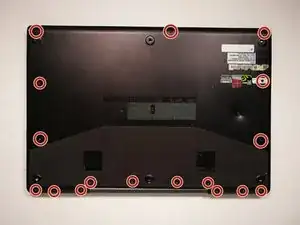
    • Locate and Remove all screws from the backplate.

  2. DHK6v5Ur6ZicZJlf
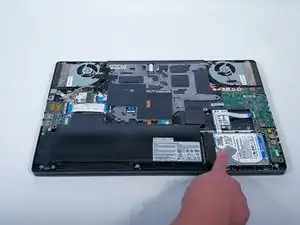
    • Locate the Hard Drive

  3. GmqmrL4ewNbw2NVk
    GmqmrL4ewNbw2NVk
    OOSKwwSG2vT5nFbi
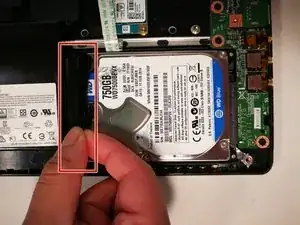
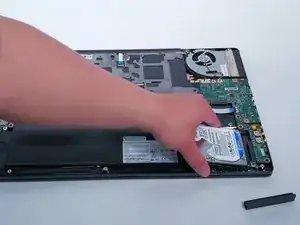
    • Locate the black rubber spacer

    • Remove space by gently pulling the flap

  4. Sa5IA5oNyZgSC2q6
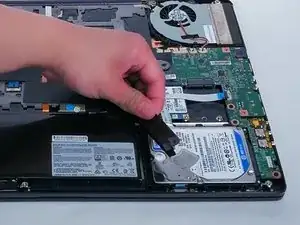
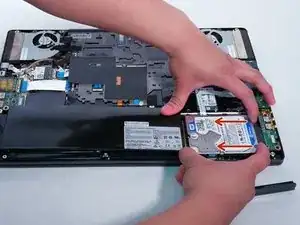
    • With two hands slide the Hard Drive to the left.

  5. vttIPXyjV6QVBh1i
    vttIPXyjV6QVBh1i
    cGyiYhJGeiClGkwl
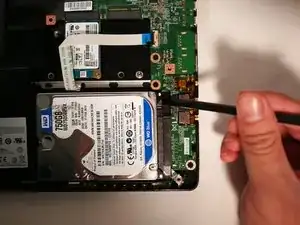
    • Lift the Hard Drive using the Spudger.

    • Pull up and remove the Hard Drive

Abschluss

To reassemble your device, follow these instructions in reverse order.

Matthew Tasker

Mitglied seit: 16/04/10

377 Reputation

2 Kommentare

The screws on my machine were Philips not torx don't know if it is different or has changed at all but all internal and external were Phillips

rambo33hockey -

bonjour

comment accéder au disque dur msata sur le msi gs 70

Vivabzh côtes d'armors -