Einleitung

Der "Disc Read Error" kommt öfter vor und ist einer der frustrierendsten Fehler.

Der Fehler kann auftreten, wenn sich Staub oder Schmutz auf der Linse angesammelt hat. Er ist zum Glück leicht zu beseitigen, du brauchst dafür nur wenige Arbeitsschritte.

  1. BMYHguFIeCVHU3N2
    BMYHguFIeCVHU3N2
    FOkpWrVUKMHbWKuI
    rNGE4xfBQ5w3UBa2
    • Lege die PlayStation 2 mit dem Boden nach oben vor dich hin.

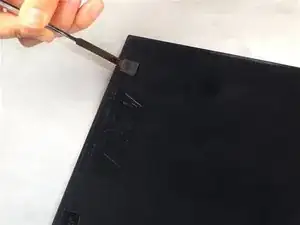
    • Heble mit dem flachen Ende eines Metallspatels die acht flachen Schraubenabdeckungen heraus.

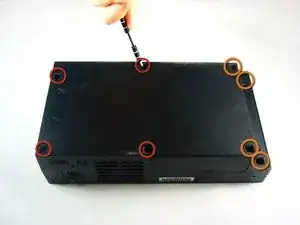
    • Entferne die folgenden acht Schrauben, mit denen die obere Abdeckung am Geräteunterteil befestigt ist:

    • Vier 55,4 mm Kreuzschlitzschrauben

    • Vier 18 mm Kreuzschlitzschrauben

    Before proceeding to step 2, Take a look at your PS2, some PS2's have 10 screws (and screw covers) instead of 8 (i found them underneath the optical drive), these instructions have mislead me and i ended up breaking my top cover for my PS2.

    Tristan -

  2. HqDNULiIEwP2Wawg
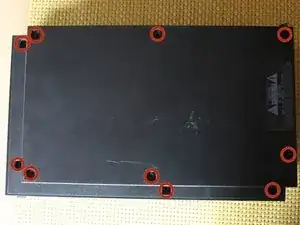
    • Die Anzahl der Füße und der Schrauben kann sich von Modell zu Modell unterscheiden. Entferne alle Füße und Schrauben im Geräteunterteil.

    • Beim Modell mit zehn Schrauben sind sechs im Teil nahe am Boden und vier im etwas erhöhten Bereich.

  3. mOuDWtEqDJZApTvu
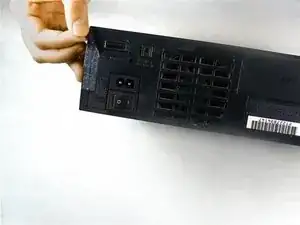
    • Ziehe den Garantieaufkleber (nahe am Netzschalter) gerade vom Gehäuse ab.

    • Um einen eventuellen Garantieverlust zu vermeiden, kannst du ihn erwärmen, sauber abziehen und später wieder ankleben.

  4. nyWcTfpYGE4MaySD
    nyWcTfpYGE4MaySD
    fvsbBetKYaRuZKV3
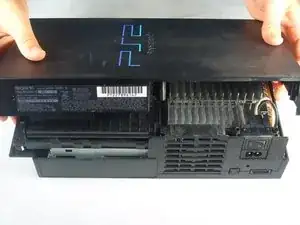
    • Lege die PlayStation 2 wieder aufrecht vor dich.

    • Hebe die obere Abdeckung vom Gehäuseunterteil ab.

    • Du kannst dir das Abnehmen erleichtern, wenn du zuerst die Hälfte in der Nähe des Netzschalters aufhebelst und gleichzeitig die obere Abdeckung in Richtung Vorderseite des Gehäuseunterteils ruckelst.

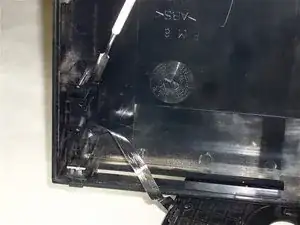
    • Die Netzanschlussleitung ist an der oberen und unteren Gehäusehälfte angebracht. Entferne behutsam die komplette Netzanschlusseinheit vom Gehäuseunterteil.

    If you have a 5000x model, then the power and reset buttons are attached to the console, not the lid. Therefore there won’t be a cord

    ARandomGuy231 -

  5. 1TOGym5InUQnnGNu
    1TOGym5InUQnnGNu
    NADmTxBMCC12E1vF
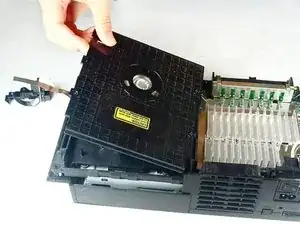
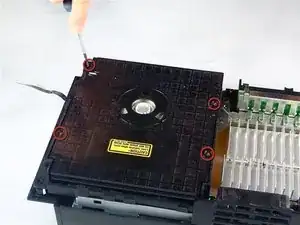
    • Entferne die vier 6,4 mm Kreuzschlitzschrauben, mit denen die obere Abdeckung des optischen Laufwerks befestigt ist.

    • Hebe die Abdeckung des optischen Laufwerks hoch und entferne sie.

    On my ps2 there were only 2 screws near the front of the lid, it snapped into place in the back. I removed it by unscrewing the screws and gently pulling the back right corner (if the front is facing you) towards the front, it gently comes loose, then pulling the back left corner sideways and it came off

    Payton Enix -

  6. WktOyRNBN1AOvkTI
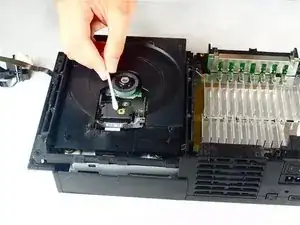
    • Wische die Linse behutsam in kreisförmigen Bewegungen mit einem alkoholfeuchten Wattestäbchen ab.

    • Befeuchtet das Wattestäbchen nicht zu sehr mit dem Reinigungsalkohol.

    • Lasse den Alkohol einige Minuten lang abtrocknen.

Abschluss

Um dein Gerät wieder zusammenbauen, folge den Schritten in umgekehrter Reihenfolge.

emessers

Mitglied seit: 29/10/09

2363 Reputation

9 Kommentare

I've tried the steps mentioned above to no avail. The problem persist. Anything else i can do besides purchasing another console? Sentimental value.Thank you.

Albie -

What I'm gonna try and do is take a laser from a PC DVD burner tray and see if I reads things. It's a long shot but you can't break what's already broken ehh. I'll let you know what happens. And if it works I will write the proper tutorial for it:)

Yuri weinberg -

HOw to use a lens cleaner dvd in Ps2

sajidsahito110 -

please answer my problem

sajidsahito110 -

hi i have a problem with my ps2. my ps2 is really old 8 years. at first 1-3 yrs ago it works fine but a little difficult to turn the game on because if fail sometimes and 4-7 yrs ago it's now really difficult to turn the game on i kept restarting it like the game plays at 15%. And now in 8 yrs it now didn't work to turn on the ps2 so i got a major problem, I know my PS2 is very old but is there any idea what to replace it with? My email is rapha_raphael54@yahoo.com so please send me a message thanks you.

op2nd -

Hi

I have problem with my ps2 when I put the cd in the screen says that it's reading the cd but after a few minutes it stops and says no data.

What should I do ? how do I fix it ? And any clues on what to do?

Arif Ali -

Best option is this doesn't work is to not use the disc reader at all. As far as the research I've done no one makes replacement lasers for PS2 yet...or rather very few do. I suggest using PS2 homebrew programs to run the games from a HDD attached to the network adapter. Even then the PS2 takes pata drives unless you use a converter and a laptop sata HDD or modify the network adapter itself...if your brave. I honestly haven't personally tried these things yet mind you I've just been researching it for a week or so.

emmy -

Tried this to fix the Cant-read-DVDs-but-can-read-CDs problem, when I put it back together, it wouldn't power on again :(

Took it apart again to see if I unplugged something accidentally and it doesn't look like I did. I hope someone will tell me this is common and I just knocked something loose but I'm afraid my ps2 might have finally died. (I've had it since 2002 though, so not bad I guess?)

endymian -

best way to fix DRE that I found was to take the laser lens off and clean the laser its self, what you done realize is dust gets under the glass lens, its a bit difficult in a way and patents is the key, there are 2 vary thin copper wires attached to the lens the copper wires are in between to magnets, and is held in place with some tacky goo, you have to be gentile but firm and lift the lens out, then take a q-tip (does not even have to be wet, best not to be you’ll be working right on top of the laser its self) and give it a few swipes. I have done this twice on 2 different ps2’s its works. No more adjustment the laser voltage (the adjustment was made to see better though the dust fyi). this is a proven method, just try it, if your to sacred to take about the laser, then dont, have someone else do it

eaespn2 -