Einleitung

If the touchpad on your Lenovo ThinkPad X1 Carbon (2nd Gen) lacks proper response, use this guide to replace it.

The touchpad is a control surface that allows you to move the cursor on your screen.

Before using this guide, check to make sure your touchpad driver is updated and clean off the touchpad surface.

Before you begin, make sure your computer is off.

  1. vJVYFGHi4AdBNVpA
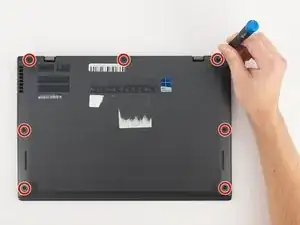
    • Using a Phillips #0 screwdriver, remove the seven 7mm screws holding the back cover onto your computer.

  2. yE5O5OyDFplvoRvl
    yE5O5OyDFplvoRvl
    1BLOxJZqCT1AVE1i
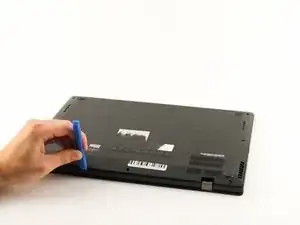
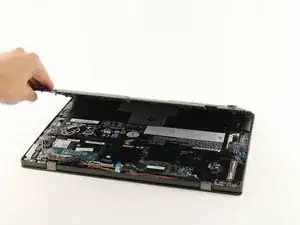
    • Use a plastic opening tool or your fingers to pry off the cover.

  3. YkCMvVCdChmPjflk
    YkCMvVCdChmPjflk
    tehbRPuh6EMHYAgw
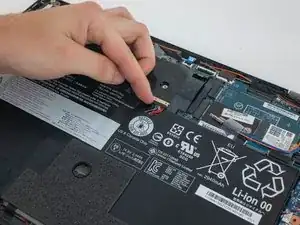
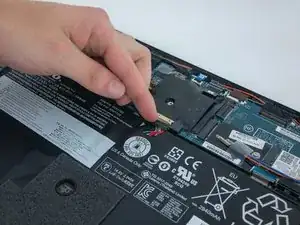
    • Using your fingers, disconnect the battery from the motherboard.

  4. sARbPUXNQQUMnBHe
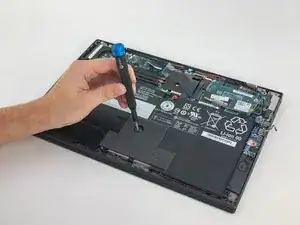
    • Using a Phillips #0 screwdriver, unscrew the five 4.3mm screws attaching the battery to the computer.

  5. GimPoGZyG5lmmcYT
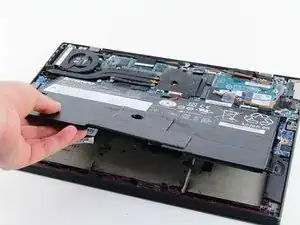
    • Remove the battery by pulling it directly towards you.

    Before installing the new battery, the attached cables connecting it to the board need to be bent or kinked in a similar manner to how the old battery’s cables were. I looked at the old battery’s cables for an idea of how to bend the new cables.

    Also, I saw how the old battery had some very thin foam attached to the battery (as seen in the photos), and that the replacement iFixit battery didn’t have such foam. I couldn’t figure out a way to remove the foam from the old battery without destroying it, so I went ahead and installed the new battery without it.

    Nhan Nguyen -

  6. gBJbl62ZhLsNY2Zc
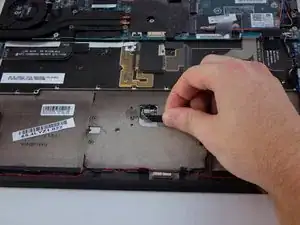
    • Remove the black ribbon cable connected to the touchpad.

  7. 3BiM4Y62arCvOMjC
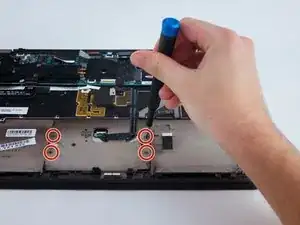
    • Use a Phillips #1 screwdriver to remove the four 1.9 mm screws holding in the touchpad.

  8. Nl1g1p6VcRR2Xgqj
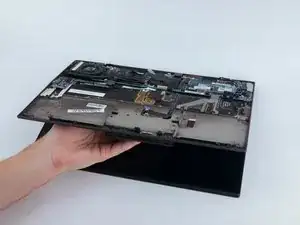
    • Remove the touchpad by opening the computer and letting it drop onto your hand.

Abschluss

To reassemble your device, follow these instructions in reverse order.

Eevee Murdock

Mitglied seit: 23/01/20

951 Reputation

0 Kommentare