Einleitung
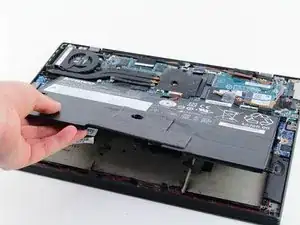
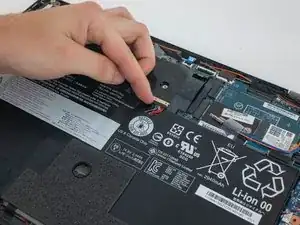
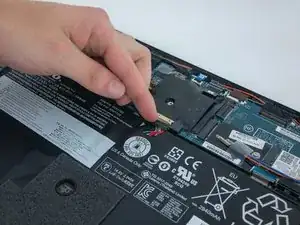
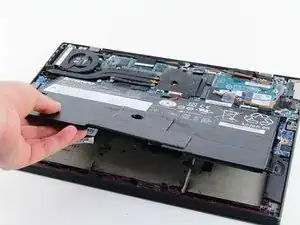
If your Lenovo ThinkPad X1 Carbon (2nd Gen) won’t turn on or last the full battery life, use this guide to replace the battery.
The battery stores the energy for your computer.
Before using this guide, check that your computer has been charged in a reliable outlet by trying multiple outlets. Also, try using multiple charging cords to make sure your cord isn’t broken.
Before you begin, make sure your computer is off and unplugged.


-
-
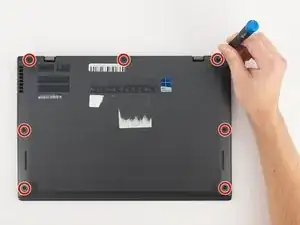
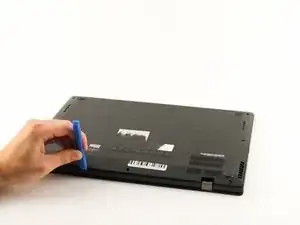
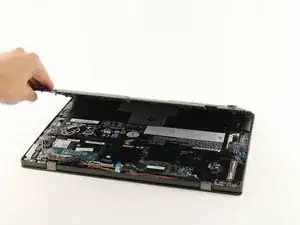
Using a Phillips #0 screwdriver, remove the seven 7mm screws holding the back cover onto your computer.
-
-
-
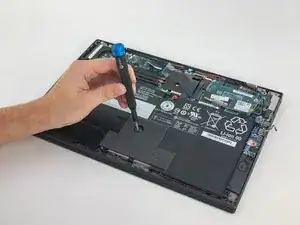
Using a Phillips #0 screwdriver, unscrew the five 4.3mm screws attaching the battery to the computer.
-
To reassemble your device, follow these instructions in reverse order.

Ein Kommentar
iFixit replacement battery is rejected by X1 Carbon gen2 chassis as not-genuine/unauthorized. Is there some additional step to getting the battery to be recognized/allowed? Something in the BIOS? Or is the battery faulty?