Einleitung

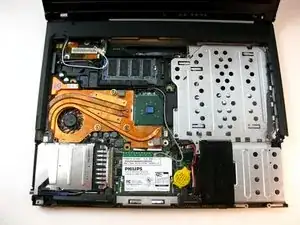
The Mini-PCI port can be accessed easily after removing the rear cover

  1. nOVTwh1ZZiXj2xdv
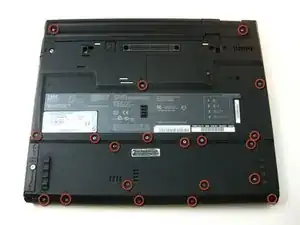
    • Unscrew the 20 Phillips screws on the underside of the T42.

    • For ease of reassembly, keep your screws organized.

  2. XSANOcwcEWryUkJN
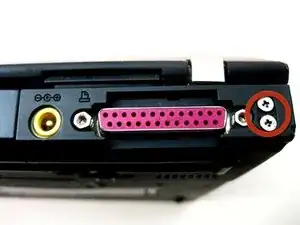
    • Unscrew the 2 Phillips screws on both sides of the T42's rear.

    leave these four screws alone. No need to remove them.

    fredwb -

    Of course you need to remove them you Dingbat! They are the main anchors of the screen hinges, Doh!

    wbcam -

    There are tiny numbers showing the lengths of the screws. 1-2-3-4 where 1 is the shortest.

    The dark red circles are not very easy to see. How about white ones?

    mattikaki -

  3. iuUeFsBx4Wrj2uXb
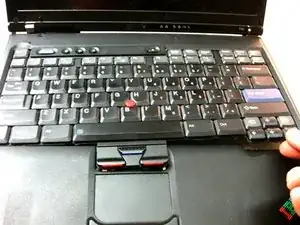
    • Flip the laptop over and open the screen.

    • The bezel and keyboard will be loose, be careful.

  4. GTJtY3mGQRbaQ12t
    GTJtY3mGQRbaQ12t
    wTbnWCPMvL2LQsAX
    • Carefully maneuver the palm rest away from the keyboard, as both the keyboard and palm rest/trackpad will come off together.

    • Remember, both the keyboard and trackpad have connectors to the motherboard. Disconnect these before completely removing either component.

  5. NMGNnF6wPLTped5N
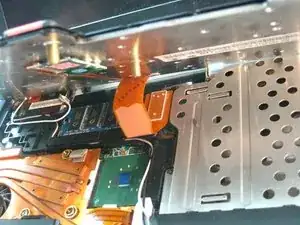
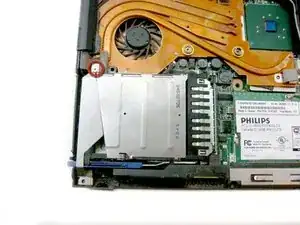
    • Remove the screw affixing the bracket down.

  6. FL1OMGJMAhILCipD
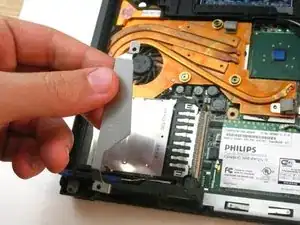
    • Lift the bracket up and out.

  7. CMJvjnFd5bibArFA
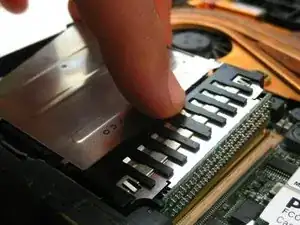
    • Carefully disconnect it from the motherboard and pull it out of the device.

Abschluss

To reassemble your device, follow these instructions in reverse order.

Gerald Watanabe

Mitglied seit: 14/04/10

201 Reputation

0 Kommentare