Einleitung
Die Rückkamera kann Bilder und Videos aufnehmen. Diese Anleitung zeigt dir, wie du sie austauschen kannst, ohne andere Bauteile zu beschädigen. Besorge dir vor der Reparatur die unten aufgelisteten Werkzeuge und Teile, die du zum effektiven Arbeiten benötigst. Wir raten zur besonderen Vorsicht beim Öffnen des Smartphones mit Saugheber und Öffnungswerkzeug.


Ersatzteile
-
-
Tropfe, falls verfügbar, etwas Isopropylalkohol unter jede Ecke des Akkus und lasse ihn einige Minuten lang einwirken, damit der Kleber geschwächt wird.
-
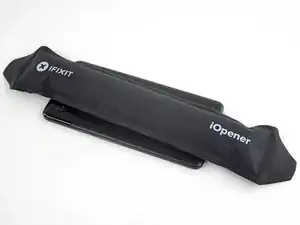
Du kannst auch einen erwärmten iOpener mindestens zwei Minuten lang auf den Akku auflegen. Erwärme ihn erneut, wenn nötig, und lege ihn auf, bis der Kleber am Akku hinreichend weich geworden ist.
-
-
-
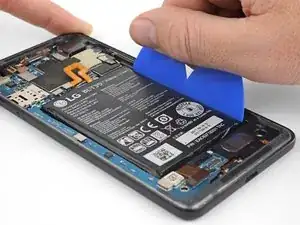
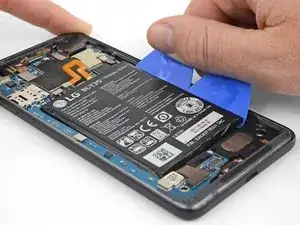
Setze ein paar Plektren oder Plastikkarten an der rechten Seite unter den Akku ein.
-
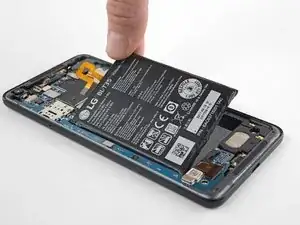
Drücke gleichmäßig und beständig. Heble den Akku langsam hoch und entferne ihn aus dem Smartphone.
-
-
-
Entferne den Akku.
-
So wird der neue Akku eingebaut:
-
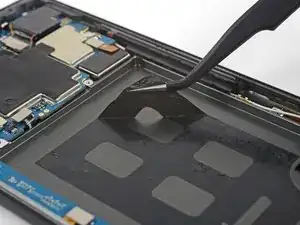
Entferne alle Klebstoffreste mit einer Pinzette vom Smartphone und reinige die Klebeflächen mit Isopropylalkohol und einem fusselfreien Tuch.
-
Befestige den neuen Akku mit vorgestanzten Klebestreifen oder doppelseitigem Klebeband. Damit es gut sitzt, ist es besser, das Klebeband erst im Smartphone, nicht am Akku zu befestigen. Das Klebeband darf keines der Kabel unter dem Akku berühren.
-
Drücke den Akku 20 - 30 Sekunden lang fest.
-
-
-
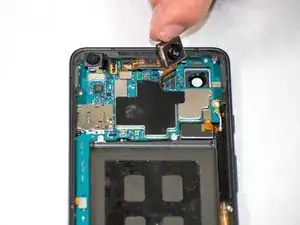
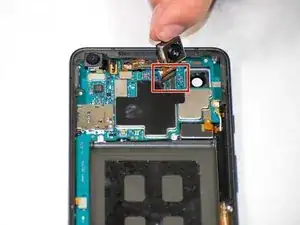
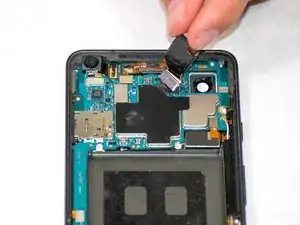
Löse den Verbinder, mit dem das Flachbandkabel am Mikrofon befestigt ist. Entferne die Rückkamera vom Gerät.
-
Um dein Gerät wieder zusammenzusetzen, folge den Schritten in umgekehrter Reihenfolge.

3 Kommentare
Is there a guide for replacing the lens cover? I bought the replacement camera and lens cover, but not sure how to replace the cover. I may not even need a new camera, since my camera is just a little blurry. Any help would be appreciated!
dcmcleod -
Unfortunately we don’t have a guide for the camera lens cover yet. It’s just adhered to the back of the phone, so you should be able to heat it and carefully pry it up, or push it out from the inside of the phone. Before installing the new lens cover make sure you scrape all the old adhesive off of the phone and clean adhesion surface with isopropyl alcohol. Then you should be able to use the provided adhesive to install the new cover. Try not to touch the clear part of the new cover since fingerprints might be tough to clean off.
Also, I’d probably try just replacing the lens cover first and then testing the camera (without sealing the phone closed) and see if that fixes your issue before you replace the whole camera. Hope that helps, and good luck with the repair!
I just recently replaced the camera and lens on a pixel 2 xl, after installing and reassembly every time I opened the camera app it just came up dark screen and closed, I cleared cache, memory and even ended up performing a hard reset on the device and nothing helped; also updated the OS and the camera app and nothing helped out. Any suggestions?
NEVER use a pointed metal tool as shown in the picture in this guide. You can damage the battery, which can cause fire and further damage the device. It is also very easy to damage the mainboard.
JaL -