Einleitung
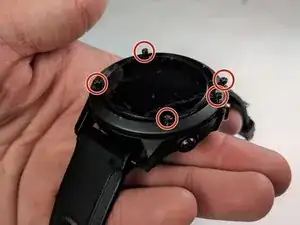
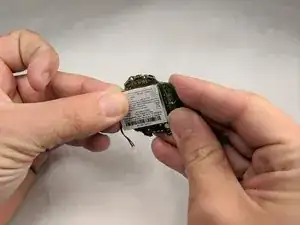
Diese Anleitung zeigt dir Schritt für Schritt, wie du den Akku einer Garmin Fenix 3 HR austauscht.


Ersatzteile
-
-
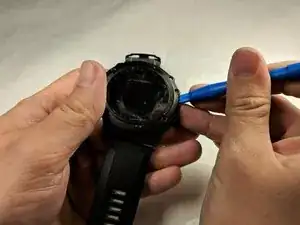
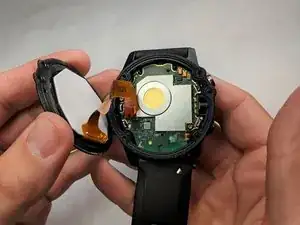
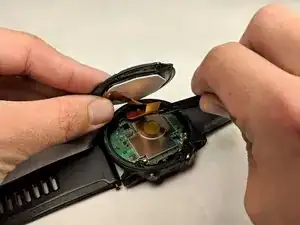
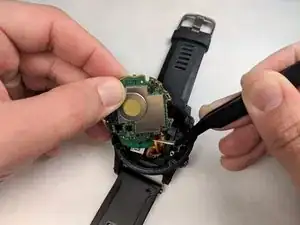
Benutze ein Hebelwerkzeug aus Plastik, um das Display vom Gehäuse zu trennen. So kommst du an die inneren Komponenten.
-
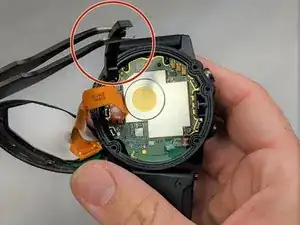
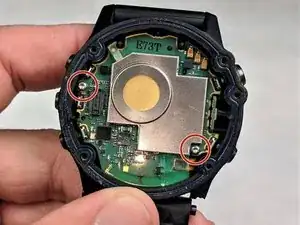
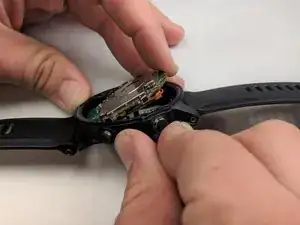
Du wirst ein kleines, loses Metall Stück sehen. Das ist die GPS Antenne, welche auch entfernt werden muss.
-
-
-
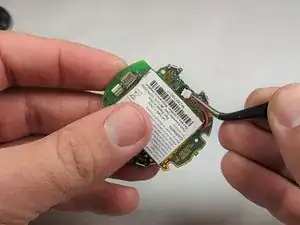
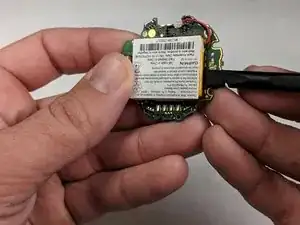
Ein weiteres Flachbandkabel ist oben mit dem Motherboard verbunden. Trenne dieses vom Motherboard.
-
Um dein Gerät wieder zusammenzubauen, folge den Schritten dieser Anleitung in umgekehrter Reihenfolge.

25 Kommentare
Does anybody do It in a fenix 5?
Same question. Fenix five /+ guide on the way?
Thank you. It saved me around over £100 to change the battery myself. Garmin quoted around £121 for battery replacement for out of warranty watch. I bought the battery around £15 and followed the guide to change the battery myself in my Fenix 3 watch. My watch does not have heart rate monitor, perhaps the ribon at step 5 is for HR monitor as I didn’t have it in my watch. Thanks again for simple, detailed and easy to follow instructions.
Where did you get the battery?
Alex -
Amazon or other 3 Party Sellerie use google for search the are tonns of Shops wich sell it
Howdy,
Followed all your steps but now the new battery will not charge. Could I have missed something in replacing the battery somehow? Pins not making contact or so?
Adrian -
I had a similar issue, I think you need to make sure the screws on the battery board are firmly tightened. Seems odd but worked for me
adagnall -
Why is a H1.3 being used here when the screws look like TORX?
Stuart Kerr -
They are in fact TORX bits. A T5 driver fit neatly.
Matthew Cole -
On my watch, it was T6. T5 is pretty loose.
Frederic Huebner Jr -
Thanks for that perfect replacement guide.
Lucian Cajacob -