Einleitung
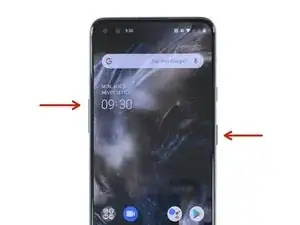
Mit dieser Methode kannst du das OnePlus Nord neu starten, wenn es sich aufgehängt hat, in einem Menü steckengeblieben oder eingefroren ist.
-
-
Drücke gleichzeitig die Lauter-Taste und die Einschalttaste.
-
Wenn das OnePlus-Logo erscheint, lasse die beiden Tasten los.
-

8 Kommentare
what is this weird problem one plus nord suddenly get switch off while on call ..
kindly advice to get ride of this problem for forever .
My mobile has hanging & automatically switch off/on please solve problem
It worked! Great help! Thank youuu
Finally - THAT worked!! Thanks. Other fixes from other sites tell you to press the “power off button”. Duh! Screen not responsive! Kudos for your research and answers.
freerealm -