

Einleitung

  1. e5LKxRUDXRQ5XWWd
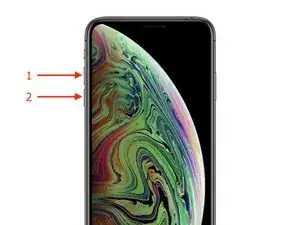
    • Drücke kurz die "Lauter"-Taste(1).

    • Drücke darauf kurz die "Leiser"-Taste(2).

    • Du musst wirklich nur sehr kurz drücken.

  2. mTlOn4CCOxTjcMZV
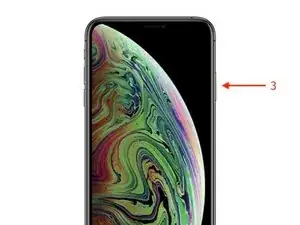
    • Halte zum Abschluss die Seitentaste gedrückt, bis das Apple Logo erscheint.(3)

    Thank you so much for such a simplified step by step guide. I was pulling my hair out for 5 hours since the other websites weren’t specific enough on how long to hold down the Volume up and down button.

    Jayman -

yvaneck

353226 Reputation

5 Kommentare

this method of shutdown would not work for me. And I can’t open up setting to go under general to shutdown either

Peggy Biggs -

Intead use 3utool in computer and restart. I used to do it

raju kb -

Worked as it said it would. Thank you

jillfarrell5707 -

pas moyen de redémarrer avec cette méthode… le mac ne reconnait pas l’Iphone XS

clement.dominiquepascal -

i tryed one way fro force start my i phone xs

press up volume botton and relerese and down volume bottle and quicj release and then hold right side button hold longer time but not work out

suhad patel -