Einleitung
How to replace the battery of a Dell XPS 15 9500 laptop. The images and information in this guide were taken from this computer's service manual.


Ersatzteile
-
-
Save and close all open files and exit all open applications.
-
Shut down your computer. Click Start > Power > Shut down.
-
Disconnect your computer and all attached devices from their electrical outlets.
-
Disconnect all attached network devices and peripherals, such as keyboard, mouse, and monitor from your computer.
-
Remove any media card and optical disc from your computer, if applicable.
-
-
-
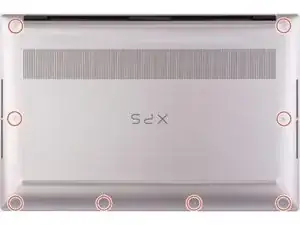
Remove the eight screws (M2x3) that secure the base cover to the palm-rest and keyboard assembly.
-
-
-
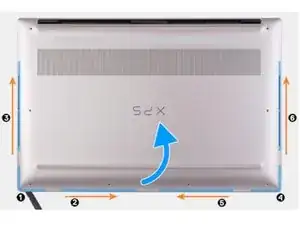
Starting from the bottom-left corner, use a plastic scribe (spudger) to pry the base cover in the direction of the arrows to release the base cover from the palm-rest and keyboard assembly.
-
Grasp the left side and the right side of the base cover and remove the base cover from the palm-rest and keyboard assembly.
-
-
-
Turn your computer over and press the power button for 15 seconds to drain the flea power.
-
-
-
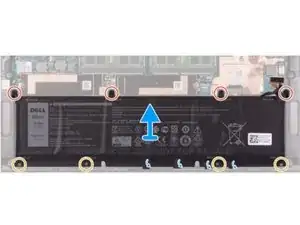
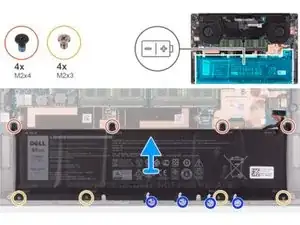
Remove the four screws (M2x4) that secure the battery to the palm-rest and keyboard assembly.
-
Remove the four screws (M2x3) that secure the battery to the palm-rest and keyboard assembly.
-
Peel the tapes that secure the speaker cable to the battery.
-
Lift the battery off the palm-rest and keyboard assembly.
-
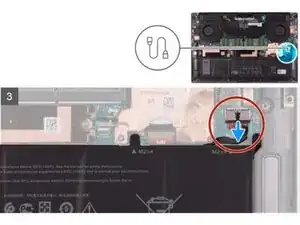

To replace the battery & reassemble your device, follow these instructions in reverse order.