Einleitung
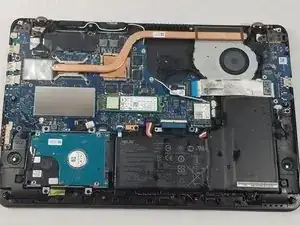
This guide will go over the process of replacing a worn-down or faulty battery in the Asus Q534U laptop computer. Laptop batteries degrade with use, so if your laptop fails to hold a sufficient charge and has a high charge cycle count, you may be able to restore your computer by replacing the battery.


-
-
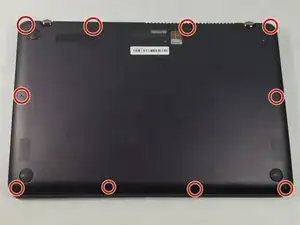
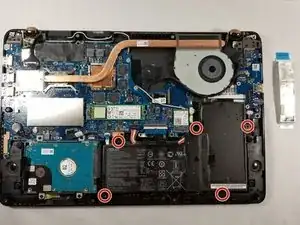
Using a T5 screwdriver, remove all 10 screws located on the underside of the laptop.
-
Pull off the back cover of the laptop.
-
-
-
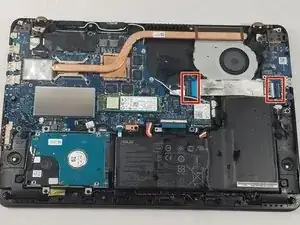
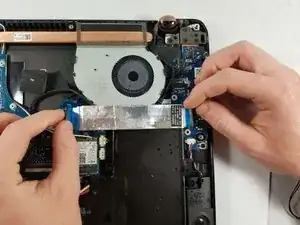
Lift up the black tab next to the silver ribbon cable.
-
Pull lightly on the blue tabs until the silver cable is free.
-
-
-
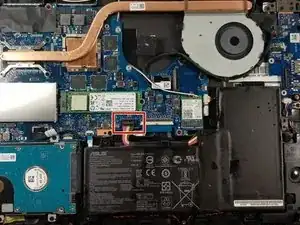
Locate the battery connector.
-
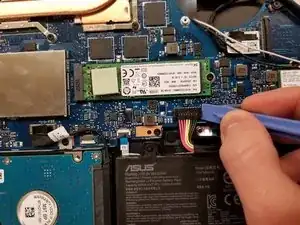
Wedge a pry tool under the battery connector.
-
Gently pull on the connector until it disconnects from the base of the object.
-
Lift the battery out of the computer.
-
To reassemble your device, follow these instructions in reverse order.

5 Kommentare
Is there a website link where I can get a replacement battery for ASUS Q534 UXK ? Model year 2016.
Can this laptop be used without a battery?
Thomas, yes. I found that out by mistake when I didn’t fully connect/lock the new cable and had to go back in and reconnect it. Worked as usual on AC power.
mmedina - thanks for the step by step. Worked like a champ for me.