Einleitung
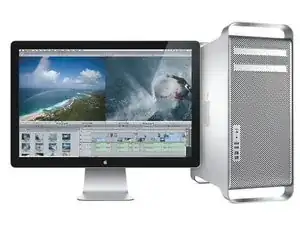
Der 2009er Mac Pro hat genau das gleiche Mainboard wie das 2010er Modell. Mit dem Firmware Update kannst du neuere Prozessoren verwenden und auf macOS 10.12 oder macOS 10.13 aktualisieren.
Es ist wichtig, eine originale Apple Grafikkarte während des Updateprozesses einzubauen. Also kram die alte GT120 hervor, die mit deinem Mac Pro geliefert wurde, falls du nachträglich eine andere Grafikkarte eingebaut haben solltest.
Falls du dich für ein Grafikkarten-Upgrade von Apple entschieden hast, könntest du auch eine andere Grafikkarte haben. Diese Grafikkarten könnten sein:
- ATI Radeon 4870
- ATI Radeon 5770
- ATI Radeon 5870
Falls du eine der oben genannten Original Apple Grafikkarten eingebaut haben solltest, dann kannst du mit dem Update fortfahren.
Nachdem du diesen Vorgang durchgeführt hast, kannst du mit dem hinzufügen von RX 580 usw. beginnen.
-
-
Als erstes musst du deinen Mac auf macOS 10.11 aktualisieren. MacOs 10.11 ist die aktuellste "offiziell" unterstützte macOS Version für den 4.1 Mac Pro.
-
Falls du mindestens macOS 10.6.6 installiert hast, solltest du den Installer einfach über den Mac App Store installieren können.
-
Solltest du noch 10.6.5 oder älter installiert haben, so musst du erst über "Softwareaktualisierung" auf deinem Mac ein Update auf die aktuellste Version von Snow Leopard (10.6.8) durchführen um auf den Mac App Store zugreifen zu können.
-
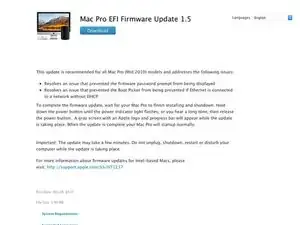
Jetzt musst du die folgenden zwei Softwarepakete herunterladen:
-
-
-
-
-
Deaktiviere den Systemintegritätsschutz auch kurz "SIP" genannt, um neue Firmware aufzuspielen.
-
Starte dein MacBook Pro neu und halte die Tasten cmd+r, um in den Wiederherstellungsmodus hochzufahren.
-
Im Wiederherstellungsmodus angekommen, gehe auf Dienstprogramme und klicke auf Terminal
-
Tippe den folgenden Befehl:
-
csrutil disable
-
Gehe zurück and starte dein MacBook Pro ganz normal neu.
-
-
-
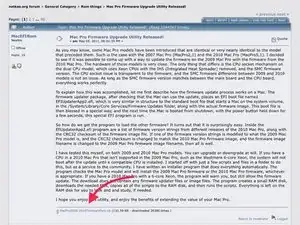
Ursprünglich wurde die Software erstellt, um die Firmware direkt von Apples Webseiten herunterzuladen, Apple hat den Speicherort und den Namen allerdings abgeändert. Du musst deswegen die .dmg Datei erst herunterladen und mounten, bevor das Softwarewekzeug laufen kann.
-
Führe einen Doppelklick auf die Firmwaredatei aus, die du im ersten Schritt heruntergeladen hast, damit das Disk Image auf dem Desktop gemounted wird.
-
Führe einen Rechtsklick auf den Firmwareupdater aus und wähle "Öffnen". Da du nicht das richtige Zertifikat hast, wird MacOS wahrscheinlich das übliche Öffnen durch Doppelklick ablehnen. Durch Rechtsklick und Öffnen vom Menü aus kannst du das umgehen.
-
Du solltest zwei Optionen angeboten bekommen, ein Upgrade auf die Firmware von 2010 und ein Downgrade auf die von 2009. Nur eine der Optionen ist ist verfügbar, je nachdem, welche Firmware installiert ist.
-
Es gibt wirklich keinen Grund für ein Downgrade auf die Firmware von 2009, da längst keines der Geräte noch unter Garantie steht und die DVDs jetzt keine Rolle mehr spielen, seit Apple die Software zum Download bereitstellt.
-
Es ist nicht notwendig, die CPU aufzurüsten, wenn du auf die Firmware von 2010 upgradest - die ursprüngliche Systemkonfiguration wird weiter so wie bisher arbeiten.
-
Lies jede der Meldungen aufmerksam, welche die Software auf den Bildschirm bringt.
-
Wenn du Schwierigkeiten hast : Probiere es mit dieser alternativen Software.
-
-
-
Wenn die Software ihre Arbeit erledigt hat, wird sie dich auffordern, den Computer herunter zu fahren. Verfahren so wie immer.
-
Wenn der Mac Pro ausgeschaltet ist, dann halte die Einschalttaste so lange gedrückt, bis die Kontroll-LED schnell blinkt und du einen Ton hörst. Die blinkende LED kommt vor dem Ton.
-
Der Computer sollte das Update nun selbständig durchführen. Der Bildschirm sollte grau mit einem Fortschrittsbalken am unteren Rand sein.
-
Dieser Fortschrittsbalken sieht anders aus, als sonst bei MacOS, er ist ein ungefülltes abgerundetes Rechteck, das sich langsam füllt, im Gegensatz zum sonst üblichen Balken, der allmählich länger wird.
-
Nach dem Flashen wird dein Computer von alleine neu starten.
-
-
-
Nach dem Neustart deines Gerätes ist es Zeit für den Moment der Wahrheit.
-
Öffne Über diesen Mac und klicke auf System Bericht.
-
Die Informationen, welche du im Menüpunkt Über diesen Mac siehst, werden dir weiterhin sagen, dass du ein Mac Pro (2009) hast, unabhängig vom Aufspielen der neuen Firmware.
-
Im Menüpunkt Systembericht solltest du im ersten Fenster eine Linie namens Modell-Identifizierung sehen. Sofern das Aufspielen der Firmware erfolgreich gewesen ist, solltest du Mac Pro 5,1 sehen.
-
-
-
Es sei denn, du hast einen guten Grund, der dagegen spricht, solltest du SIP aktivieren. Du musst erneut auf Recovery Mode gehen und den Terminal öffnen.
-
Tippe den folgenden Befehl:
-
csrutil enable
-
Starte dein Gerät neu und lass es in den Desktop Betrieb hochfahren. Öffne ein neues Terminal Fenster und tippe den folgenden Befehl ein, um den derzeitigen SIP Status zu sehen.
-
csrutil status
-
Bei erfolgreichem Abschluss solltest du folgende Linie sehen:
-
System Integrity Protection status: enabled.
-
-
-
Und das ist alles. Nun solltest du in der Lage sein, deinen Prozessor zu aktualisieren, wodurch dir viele Optionen zur verfügung stehen.
-


92 Kommentare
once installed the firmware 5.1 can be updated in the installation of the new OS?
Do you mean to update to 10.13? Yes, you can do that firmware update as well. It should work automatically.
Can you use a processor tray designed for a 2010-2012 model after the firmware update? Not inclined to actually replace the CPU chips.
I’ve heard conflicting reports- at the very least, if it does boot with a 2010 tray, my understanding is the fans will go crazy. I don’t think it’s recommended to swap trays between versions as they have a slightly different firmware and construction. Replacing the chips is pretty easy though, and we have a guide for that as well!
Fans go crazy, There are two SMC chips on MacPro. One of them is on the backplate and the other one is on the cpu tray. In order to run MacPro smoothly, SMC chips needs to be synced upon boot. If they can not sync then the fans go crazy. You need to swap the TC4424P SMC chip on the 2009 cpu tray with the TC4424P SMC chip on the 2010-2012 cpu tray. This job needs top soldering skills!!. If you manage to do that then the SMC chips will be in sync and the MacPro will run smoothly. I did it with my 2009 MacPro 4.1 with 2009 4 core cpu and upgraded it to a 2009 MacPro 5.1 with 2012 12 core cpu. Also after the job done, I soldered remaining SMC from the 2012 cpu tray to my 2009 cpu tray with no SMC on it. After that it was a perfectly working 2012 cpu tray. Gave the tray to a friend who needs a 2012 cpu tray for his 2012 MacPro. He still uses that and I still use mine. You just need to find someone with top soldering skills if you don’t have any.
Anil -
What restrictions are there if you no longer have an original Apple GPU? My MacPro has an ATI Radeon HD 4870 512 MB to drive my 30” Apple monitor.
We’re in a similar boat: I’ve got a Radeon HD 5770, purchased from Apple, driving a 30-inch Cinema Display. I got through both BIOS upgrades fine. Perhaps display adapters with non-Apple firmware cause problems.
A quick note that might save someone trouble: Following these well-crafted instructions, my Mac Pro kept booting to my OS (10.11) instead of the firmware updater. Starting over from a Lion (10.7) startup partition worked, and then I was able to return to 10.11 to do an in-place upgrade to High Sierra from the App Store. The second firmware update from the OS installer ran without issue.
Hi Ron, thanks for the info! You should still be okay with upgrading if your GPU is one of the upgrade picks Apple offered. I have amended the introduction to reflect this as well.
If memory serves, there were 3 other GPUs Apple offered as upgrades for the 09/10 model Mac Pro. These are the
• ATI Radeon 4870
• Radeon 5770
• Radeon 5870
Provided they’re all still official Apple cards, you should be okay to proceed.
It is safe to upgrade my MacPro4,1 with an NVIDIA GeForce GTX 680? Thanks.
suzzz -
You have a 4870 that doesn't have the Apple EFI? If it is a reference model card, it can be pretty easily flashed with Mac EFI (Apple boot screen). I have flashed these for 4 of my friends with good success.
Is there another place to download the tool? I can’t seem to connect to Netkas.
Jacob Osier -
https://web.archive.org/web/201901232023...
I found a link for if the forum is down.
Jacob Osier -
I had to change the above URL to that to make it work:
https://web.archive.org/web/201901232023...
This might work as a direct download too (from the linked forum page):
http://forum.netkas.org/index.php?action...
Chris
Christian Krupa -
Therefore thisupgrade whant happen with a different card?
Is there a way to work around it?
I nolonger have the original
d1nchiana@gmx.com -
you just need to have a card with the original EFI from Apple- there’s some other cards around, like the Radeon 4870 for example. It may work with newer “compatible” cards like those from Macvidcards.com, but I’m not sure.
Josh Calvetti -
I no longer have the original Apple GPU. Instead, there is an ATI Radeon HD 4870 512 MB installed in my Mac Pro 4,1 (early 2009). I do get the startup and sign-in screens as the system boots. Is it safe to try the 5,1 firmware update?
Ronald Koontz -
the Mac Pro EFI update is not working on my MacPro 4,1 2009.
OSX El Capitan 10.11.6
error:
“This software is not supported on your system”
Who can help me?
Mark -
Mark, I have the same issue “This software is not supported on your system”. You found a fix?
john -
Mark, just got it sorted and flashed to 5.1. You must 1. put the “MacProEFIUpdate.dmg” on your desk top. 2. Unpack the “MacProEFIUpdate.dmg” by double clicking but DO NOT RUN the “MacProEFIUpdate.pkg”, leave it open on your desktop 3. The MacProEFIUpdate.pkg will be read by the “Mac Pro 2009-2010 Firmware Tool.app” when you run that. 4. Run the “Mac Pro 2009-2010 Firmware Tool.app” and follow the instructions, easy. Good luck.
john -
The link to the installer in step 1 is not working.
Can someone provide an active link!
G Graff -
Which installer? macOS or the utility? All the links are still working for me.
Josh Calvetti -